

























| Key Takeaways |
|
|
|
What is an Antidetect Browser?
An anti-detect browser (or an anti-detection browser) is a tool based on popular web browsers (often based on Chromium or Firefox) designed to conceal a user’s actual digital identity, making it almost impossible for websites to track and monitor you.
These specialized web browsers can be used to manipulate various browser fingerprint attributes, such as device, operating system, plugins, time zone, location, and more. Users can also create custom digital profiles, each with a unique, hard-to-link fingerprint, enabling multiple identities.
An example of browser fingerprint:
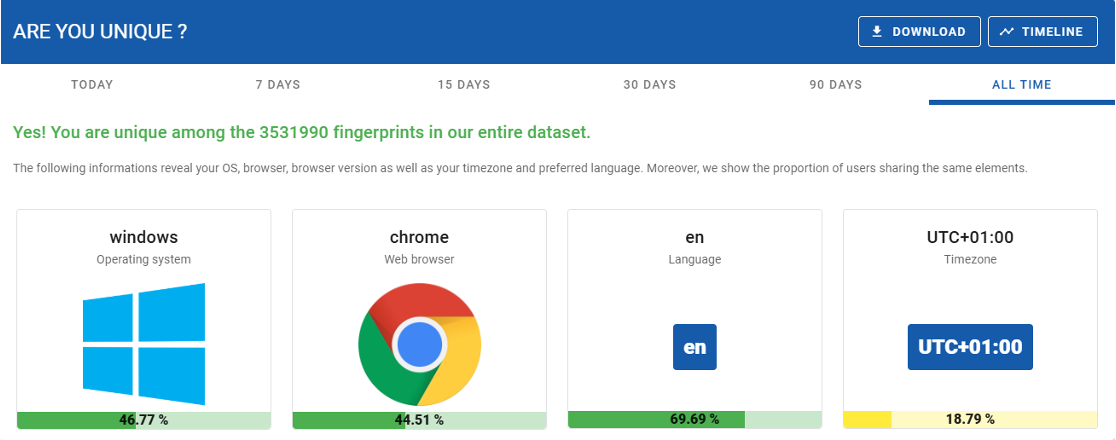
Antidetect browsers are used by both individuals and organizations. Digital marketing teams, SMM agencies, journalists, and cybersecurity professionals use them to manage multiple social media accounts or e-commerce profiles, safely share browser profiles with team members, access restricted websites, and more.
Even though the best anti-detect browser apps are advertised as innocent tools designed to help protect your privacy and (ironically) to protect against cybercriminals, fraudsters can also benefit from them.
Banks, e-commerce sites, and other platforms typically monitor a user’s unique browser profile (their “fingerprint”) to detect suspicious behavior or unauthorized logins. Antidetect browsers undermine these defenses by altering that fingerprint, allowing threat actors to slip under the radar of anti-fraud systems. This means fraudsters can impersonate legitimate users or juggle dozens of accounts, avoiding detection by conventional device fingerprinting tools – a challenge for businesses working to prevent online fraud.
These tools also have legitimate applications. However, their ability to bypass ordinary tracking and fraud checks has made them a popular tool among fraudsters. Cybercriminals also develop proprietary antidetect browsers that are sold on the dark web.
How do antidetect browsers work?
Antidetect browsers operate by intercepting and modifying the data that a normal browser would share with websites via JavaScript and other APIs. Antidetect browsers insert a layer that catches these queries and returns fake values in place of the real ones.
Here’s a breakdown of the techniques used by antidetect browsers:
1. IP address spoofing
- Simply changing browser fingerprints isn’t enough if all activity originates from the same IP.
- Antidetect browsers route traffic through proxies, VPNs, or Tor to assign each browsing profile a different IP.
- Example: A user may assign one profile a U.S.-based residential proxy, while another appears to be from Europe or Asia.
2. Profile isolation (multi-account management)
- Each browser profile acts as a separate digital identity with isolated cookies, cache, and local storage.
- Prevents tracking systems from linking multiple accounts to the same user.
- Example: Users can operate multiple accounts on the same platform (Facebook, Amazon, LinkedIn, eBay, or Gmail) without triggering suspicion checks.
3. Cookie management (session spoofing)
- Websites track users using cookies stored in the browser.
- Antidetect browsers store cookies separately for each profile, preventing cross-account detection.
- Fraudsters can import stolen cookies from breached accounts, allowing them to resume someone else’s session without logging in.
4. Canvas fingerprinting
- Websites use canvas fingerprinting to detect users by how their browser renders graphics.
- Antidetect browsers can randomly modify canvas outputs, preventing tracking systems from recognizing unique patterns.
- If a website uses canvas rendering to detect a visitor’s device, an antidetect browser returns altered data to break tracking.
5. WebRTC IP leak prevention
- WebRTC (Web Real-Time Communication) can expose a user’s true IP address, even when using a VPN or proxy.
- Antidetect browsers disable or spoof WebRTC leaks, ensuring that a user’s real IP address is never revealed.
- A cybercriminal using a VPN or proxy to appear to be from London could be exposed if WebRTC leaks their real IP address from Russia.
6. Modifying HTTP headers & requests
- Websites examine HTTP headers and request order to identify bot-like behavior.
- Antidetect browsers shuffle HTTP request sequences and modify headers to appear as a legitimate user.
- Fraudsters can imitate user traffic patterns, making bot activity harder to detect.
7. Using different browser profiles (fingerprint rotation)
- Some antidetect browsers allow users to dynamically rotate through multiple preconfigured fingerprints.
- This ensures that even if one identity is flagged, the next session appears as a completely different user.
- Users might cycle through ten different fingerprints per session, each appearing as a new, unrelated device.
Legitimate Uses of Antidetect Browsers
Here are a few industries and scenarios where antidetect browsers serve a practical, legitimate purpose:
- Digital Marketing and Advertising: Marketing and advertising professionals often need to manage multiple accounts on Google, Facebook, or Instagram. These platforms usually limit one account per browser or enforce strict anti-multi-account policies. Antidetect browsers allow social media managers to run multiple client accounts or ad campaigns from a single machine without being flagged.
- E-commerce and Retail Management: Sellers on e-commerce marketplaces might use antidetect browsers to handle multiple storefronts or user accounts. This can be useful for legitimate reasons, such as testing how their product listings appear to users in different regions (by switching profiles to different locations) or managing separate buyer accounts for market research. Web scraping for price comparisons can also be done more safely with antidetect browsers to avoid being blocked.
- Cybersecurity Testing and Research: Cybersecurity professionals and fraud analysts use antidetect browsers to simulate a fraudster’s behavior in a controlled environment. Penetration testers or red teamers might use these browsers to evade detection during an engagement when testing the resilience of a client’s fraud detection mechanisms. Researchers investigating the dark web and underground forums also use antidetect setups to protect their identity.
Privacy-conscious users, journalists, or activists often use antidetect browsers to avoid invasive tracking or to bypass online censorship. A journalist might use an antidetect browser to maintain separate online personas for sensitive investigations, avoiding linking their research activities back to their real identity.
In these legitimate cases, the common theme is multi-account management and anonymity. The goal is to avoid linking or tracking, but not to commit fraud. Unfortunately, the same capabilities that benefit these use cases are exactly what attract cybercriminals.
How Fraudsters Leverage Antidetect Browsers
Threat actors combine the functionality of antidetect browsers with stolen credentials or banking details to access compromised social media, email, or bank accounts without being detected by anti-fraud solutions.
Anti-detection apps enable threat actors to spoof dozens of web browser and hardware configurations (e.g., WebGL, Canvas, resolution, fonts, geolocation, IPs, browsing habits) in real time and create numerous profiles to mimic legitimate user behavior.
Furthermore, some antidetect browsers can automate specific tasks or simulate human-like browsing behavior such as typing. Another function is collecting cookies on websites, which anti-fraud solutions identify as an attribute of an old and legitimate device.
Here’s how fraudsters use antidetect browsers against websites in various industries:
E-commerce
- Account Takeover (ATO): Threat actors use stolen credentials to access accounts, change shipping information, and make fraudulent purchases.
- Carding: Threat actors test stolen bank card information to make small purchases without attracting attention.
- Creating Fake Accounts: Threat actors set up many accounts to abuse promotional offers, leave bogus reviews, or resell limited-edition goods.
Gambling
- Bonus Abuse: Cybercriminals take advantage of sign-up offers or promotions across multiple accounts to “make” more money than legitimate users.
- Affiliate Fraud: Threat actors inflate referral traffic or conversions using numerous fake profiles that appear genuine.
- Match-Fixing: Fraudsters distribute bets based on fixed/rigged outcomes across dozens of accounts (each on different fingerprints) and cash out a large combined reward.
Financial institutions
- Account Creation: Threat actors open fraudulent accounts to launder money or receive funds transferred from compromised accounts.
- Fake Loan Applications: Fraudsters apply for loans and disappear with the money using fabricated identities created with antidetect browsers.
- Banking Session Hijacking: Fraudsters load stolen banking session cookies into antidetect browsers to replicate the victim’s device fingerprint and IP address, then execute unauthorized transactions undetected.
Common Fraud Schemes Enabled by Antidetect Browsers
The most common fraud schemes enabled by antidetect browsers are account takeover attacks, bonus abuse and promotion fraud, fake account creation, credential stuffing campaigns, and synthetic identity fraud.
Each one depends on a single operator passing as many unrelated, legitimate users, and antidetect browsers supply that capability by spoofing device fingerprints and isolating each profile so anti-fraud systems treat one threat actor as separate people. The schemes pursue different goals, from stealing accounts to draining promotions to building fake credit, but all five rely on the same fingerprint manipulation to stay under the radar.
Account takeover attacks
In an account takeover (ATO), an attacker gains access to a victim’s account and takes control of it. Banking and e-commerce profiles are the usual targets, since they hold money and saved payment details that the attacker can spend. While compromised login credentials provide initial access, the real challenge for attackers is device fingerprinting. Financial institutions and digital platforms routinely flag accounts when a login attempt originates from an unrecognized device.
Antidetect browsers remove that obstacle. The attacker loads the victim’s stolen session cookies or replicates their device profile, then logs in from what appears to be the original, trusted device. Group-IB classifies antidetect browsers as one of the signals our Fraud Protection platform looks for during account takeover attempts, alongside logins from unusual locations and remote access tools.
Bonus abuse and promotion fraud
Bonus abuse exploits promotional offers such as welcome bonuses, referral rewards, and free bets by claiming them across many accounts and cashing out before the operator catches on. It hits e-commerce and online gambling platforms hardest. A genuine promotion assumes one reward per real person, and the abuser breaks that assumption by registering as many people.
Antidetect browsers make each fake account appear to come from a different device and are a part of the bonus abuse tactic, used to spoof operating system details, screen resolution, time zones, geolocation, and canvas and WebGL fingerprints so security systems cannot connect one account to the next.
Refer-a-friend fraud depends on this directly, since the abuser rotates fingerprints and IP addresses so every self-referred “friend” appears to be a distinct, unrelated user. Operators bear the financial burden via drained promotional budgets and chargebacks resulting from deposits made with stolen credit cards.
Fake account creation
Fake account creation is the foundation on which the other schemes are built. The attacker mass-registers accounts under stolen or fabricated identities, then uses them to abuse promotions, plant fake reviews, or resell limited stock. Bots handle the registration at volume, and the antidetect browser keeps each account separate, with its own isolated cookies and device fingerprint. Without that isolation, a platform links the accounts the moment they share a device or an IP address.
To keep the accounts from tracing back to one operator, fraudsters lean on a few evasion techniques:
- Recycling contact details with minor changes, like johndoe1@ and johndoe2@
- Routing through public Wi-Fi, emulators, or browser-isolation tools to dodge IP and device linking
- Recruiting friends and family to create clean accounts
- Buying aged accounts to make the activity look established
Each clean-looking account then becomes raw material for the other schemes, whether draining a promotion or padding affiliate traffic.
Credential stuffing campaigns
Credential stuffing is account takeover on an industrial scale. Attackers take username-password pairs leaked in one breach and automate login attempts across many other sites, betting on password reuse.
In a typical campaign, the attack may be visible in the logs, but not always in such a neat way. Some runs generate thousands of failures from a narrow set of IPs, while others are spread across many proxies, device fingerprints, and locations to blend in with ordinary traffic. Anti-fraud systems are tuned to detect these patterns, but attackers keep refining their tooling to minimize obvious signals.
Antidetect browsers help remove some of the telltale signs. They can pair automation with rotating proxies and fresh device fingerprints, and more advanced setups may mimic human cues such as mouse movement and typing rhythm. The result is attempts that look less like a single coordinated source and more like normal logins coming from many separate devices.
Synthetic identity fraud
Synthetic identity fraud creates a new, fictitious person by blending real and fabricated data, often using a genuine Social Security number from a minor or deceased individual alongside a fake name and address. Unlike traditional identity theft, the persona may not map cleanly onto a single living victim, making the fraud harder to notice and report. The synthetic identity can pass onboarding checks and build credit over months or years before disappearing in a bust-out that maxes every available line at once.
Anti-detect browsers support this operation during their long incubation. Shared infrastructure remains one of the strongest detection signals because multiple unrelated accounts traced to the same device, network, or browser configuration often indicate coordinated fraud.
Anti-detect tools are designed to break that linkage by giving each synthetic persona its own device environment, helping a fraud ring stay less visible while it matures.
The fraud unfolds across three phases:
- Identity manufacturing: Shape real and fabricated data into a credible persona before it touches any financial system.
- Credit building: Enter through low-risk accounts, keep a clean repayment record, and stretch credit limits across multiple institutions.
- Bust-out: Withdraw all available funds and credit at once, then abandon the identity for good.
The losses are also expected to grow as automation and generative AI make it easier to produce and manage large numbers of personas. Deloitte projects that synthetic identity fraud could generate at least $23 billion in losses by 2030, making it a major fraud risk for financial institutions.
Why Traditional Fraud Detection Struggles Against Antidetect Browsers
Traditional fraud detection struggles against antidetect browsers because it relies on the information a browser reports about itself, and antidetect browsers are designed to control that information. Most legacy systems assess risk by examining the device behind a session, the network it connects to, and any history of abuse associated with them. An antidetect browser varies those details from one session to the next, so a returning fraudster appears as a new, unremarkable user.
The result is a weak point at every layer of a conventional defense:
- Device fingerprinting: These systems identify a device from the attributes its browser reports, such as screen resolution and installed fonts. An antidetect browser alters those attributes for each profile, letting a single machine present itself as many distinct devices.
- IP and location checks: Blocklists catch known malicious addresses, but antidetect setups route traffic through residential proxies that relay it through genuine home connections, so the session resembles an ordinary local customer.
- Static rules: Rules that flag a specific device or address lose their effect once those values are rotated on every visit.
- Account linking: Platforms typically connect related accounts through a shared cookie, device, or IP address. Profile isolation strips out common signals, so accounts operated by a single person appear unrelated.
The common thread is consistency. These checks work only when the signals they rely on are stable and trustworthy, and an antidetect browser makes them neither. Reliable detection has to look beyond what the browser reports and toward signals it cannot easily imitate: how a real person types and navigates, the pace of their actions, and the patterns that connect accounts that present as strangers.
Best Practices for Detecting and Preventing Antidetect Browser Fraud
The best way to detect and prevent antidetect browser fraud is to stop relying on the data the browser reports and build layered detection around the signals it cannot control: user behavior, server-side correlations, and cross-account links. No single check catches a well-configured antidetect browser, so the goal is a stack where defeating one layer still leaves the others standing.
Analyze behavior, not just attributes
Deploy behavioral signals that profile how a user types, moves a cursor, and navigates a page. These patterns are hard to reproduce even behind a flawless fingerprint, so they can expose automation and account handoffs that static signals miss.
Probe for spoofing instead of trusting the fingerprint
Use active checks that surface manipulation artifacts, such as canvas noise, mismatched attributes, or headless-browser markers, rather than accepting the values the browser volunteers.
Correlate across sessions and accounts
Link accounts through signals that profile isolation does not remove, such as shared payment instruments, server-side device and network correlations, and repeated behavioral patterns. This is what turns ten “unrelated” accounts back into one operator.
Score the network, do not just block it
Detect VPN, proxy, and Tor traffic, and feed it into a risk score rather than relying on static IP blocklists, which fresh residential proxies can slip past.
Add adaptive, phishing-resistant authentication
Trigger step-up verification with passkeys or hardware security keys on high-risk sessions, so stolen credentials and a faked fingerprint still hit a wall.
Harden onboarding against synthetic identities
Add liveness detection and document-authenticity checks at sign-up, and watch for robotic onboarding behavior, such as pasted identifiers and inhuman form-completion speed.
Run bot detection across web, mobile, and API channels
Use a consistent bot-detection layer beneath it all, since the same automation that powers credential stuffing also drives high-volume fake-account registration.
The durable approach is continuous risk scoring from onboarding through transaction, with behavioral and server-side signals layered so an attacker who beats one control still trips another.
How Group-IB Fraud Protection Fights Against the Illegal Use of Antidetect Browsers
Group-IB Fraud Protection team has been actively studying and countering antidetect browser techniques to help businesses stay a step ahead. Through a combination of fraud intelligence, device fingerprinting, and behavioral analysis, Group-IB provides tools to detect when a supposedly “legitimate” user is actually using an antidetect browser.
Here’s how our anti-fraud solution works:
- Group-IB Fraud Protection analysts reverse-engineer fraudulent antidetect browsers to identify their patterns and techniques. With this information in hand, we can identify illegitimate traffic from antidetect browsers and protect our customers against it.
- Group-IB Fraud Protection’s Anomaly Detection feature examines browser fingerprints to detect any inconsistencies or unusual patterns that could indicate manipulation by an antidetect browser. This approach relies on data analysis and involves comparing fingerprints against known “normal” profiles.
- Group-IB’s Web Snippet (a code injected into the website) is used to force antidetect browsers to reveal the noise. It monitors multiple, varying Canvas fingerprints and identifies different types of noise, including dynamic, static, and text-based.
- Group-IB Fraud Protection also uses IP intelligence, scoring, VPN, and private and public proxy detection data to determine whether parts of various device fingerprints were spoofed or generated, and which types of fraud tools were used.
As attested by Frost & Sullivan, the Group-IB Fraud Protection platform is recognized as a leading anti-fraud solution within the industry. Our solution stands out from other offerings as the only anti-fraud solution that encompasses all key functionalities: bot detection, behavioral biometrics, explainable AI, and API security.
Learn more about how your organization can use Group-IB’s Fraud Protection to effectively combat advanced digital fraud.