


























| Key Takeaways: |
|
|
|
|
Although many iOS users believe their devices are secure against such incursions, the rise of Pegasus spyware as one of the most sophisticated mobile malware threats in recent years has exposed critical vulnerabilities in even the most trusted systems.
The advanced spyware (designed by Israeli cyber-intelligence company, NSO Group) was originally marketed for law enforcement and intelligence agencies to track terrorists and criminals, but in practice, it has been misused to spy on journalists, activists, and political figures.
This article provides an in-depth look at what Pegasus spyware is, how it targets both iOS and Android devices, the risks it poses, and how to detect Pegasus spyware infections.
What is Pegasus spyware?
The first iOS exploitation by Pegasus spyware was recorded in August 2016, facilitated through spear-phishing attempts—text messages or emails that trick a target into clicking on a malicious link.
Pegasus spyware is a malicious form of software designed to gather sensitive information from mobile devices without a user’s knowledge. Initially licensed by governments for targeted cyber espionage, it is a sophisticated tool for remotely installing spyware on devices to pry into and reveal information. The spyware can activate an infected device’s camera and microphone, turning your device into a powerful 24/7 illegal surveillance tool without you ever noticing.
NSO Group has continually pushed the boundaries of spyware intrusion techniques, evolving from early click-required hacks to the latest zero-click exploits that invisibly penetrate devices.
Pegasus malware’s zero-click capability makes it particularly dangerous, as it can infiltrate devices without any user action. It can silently collect a wide range of sensitive information from both iOS- and Android-powered devices, including messages, audio logs, GPS location data, device information, and more.
In recent years, NSO’s engineers have been deploying new attack vectors (such as SMS, iMessage, WhatsApp calls, and even Apple’s HomeKit/Find My features) to breach target phones without user interaction—making it an effortless tool for tricking users into installing the spyware without their knowledge.
These advances, however, have been met with international condemnation. NSO Group today faces blacklisting, lawsuits, and a tarnished global reputation after its spyware was linked to egregious privacy violations.
Learn More
Download our latest High-Tech Crime Trends Report 2025 for in-depth insights on key cybersecurity threats in 2025.
How does Pegasus spyware work?
Pegasus is extremely efficient due to its strategic development to use zero-day vulnerabilities, code obfuscation, and encryption.
NSO Group provides two methods for remotely installing spyware on a target’s device: a zero-click method and a one-click method.
- The one-click method includes sending the target a regular SMS text message containing a link to a malicious website. This website then exploits vulnerabilities in the target’s web browser, along with any additional exploits needed to implant the spyware.
- The zero-click method does not require any action from device users to establish an unauthorized connection, as they exploit ‘zero-day’ vulnerabilities to gain entry into the system. Once the spyware is installed, Pegasus actively captures the intended data about the device. After installation, Pegasus needs to be constantly upgraded and managed to adapt to device settings and configurations. Additionally, it may be programmed to uninstall itself or self-destruct if exposed or if it no longer provides valuable information to the threat actor.
Once installed, the Pegasus malware runs in the background as it gains high-level privileges (root or kernel-level access) on your phone, essentially jailbreaking or rooting the device to bypass security protections. Pegasus can read your private messages and emails, listen to phone calls, capture screenshots, log keystrokes (passwords), track your location, and harvest information from apps (chat apps, social media, etc.)
The stolen data is then periodically sent back to Pegasus’s operators. If it temporarily can’t reach its command-and-control servers (say, no internet), Pegasus will store data in a hidden, encrypted buffer on the phone and wait until connectivity is restored to transmit the information.
For an added layer of stealth, Pegasus has a self-destruct mechanism: if the spyware detects something is amiss (for example, it’s on the wrong device or it hasn’t contacted its server for a certain period), it can uninstall itself. This means evidence of Pegasus spyware might vanish before a victim realizes their phone was infected, making Pegasus extremely challenging to detect using conventional antivirus tools.
How Pegasus Spyware targets smartphones (iOS and Android)
Pegasus doesn’t spread like a typical malware; instead, it carefully targets specific smartphones using a range of sophisticated attack methods.
Both iOS and Android devices can be compromised by Pegasus, though the exact infection techniques may differ slightly per platform – further highlighting how determined Pegasus’s operators can be when targeting someone.
Here are some of the main ways Pegasus spyware can infiltrate your smartphone:
- Zero-Click Exploits: Pegasus is perhaps most notorious for its zero-click attack vectors. On iPhones, Pegasus has repeatedly exploited flaws in Apple’s apps and services – for example, iMessage was a common target. Attackers could send a specially crafted iMessage or even a FaceTime call that automatically exploits a vulnerability on the device, silently installing Pegasus.
- Malicious Links (Spear-Phishing): The first known Pegasus iOS exploitation was uncovered in August 2016 through targeted spear-phishing campaigns, deceptive text messages and emails that tricked users into clicking on malicious links. The target receives a text message or email with a deceptive link. If clicked, that link secretly exploits the device and installs Pegasus.
- Network Injection Attacks: If a target is browsing the web over an insecure (HTTP) connection, Pegasus can inject malicious data into the traffic to redirect the user to a spyware installation page. Such network injection attacks require the attacker to be on the same network or in close proximity (for example, by setting up a rogue Wi-Fi hotspot), but they enable infection without the user clicking an obvious link.
- Physical Installation: While far less common, Pegasus can be installed through physical access to a device. If attackers can briefly get hold of your phone (for instance, by plugging it into a computer via USB), they could manually install Pegasus spyware.
In the last few years, NSO has continually found new avenues into devices, adapting to and overcoming the latest security protections. Notably, many of these attacks are “zero-day” exploits, meaning they abuse previously unknown software vulnerabilities. NSO’s business has essentially been to discover or purchase such zero-days and weaponize them for spyware delivery.
Potential risks and consequences of Pegasus Spyware on your device
Having Pegasus spyware on your device is a severe compromise of your privacy, security, and even safety. Here are some of the potential risks and consequences if your smartphone is infected with Pegasus:
- Complete Surveillance of Communications: Pegasus grants attackers real-time access to your calls, texts, and emails. Any conversation you thought was between you and a trusted person could be monitored by a Pegasus operator without you knowing.
- Unauthorized Camera and Microphone Access: The spyware can remotely turn on your phone’s camera or microphone at will. This means an attacker might silently record your meetings or personal moments by activating your microphone, or even spy on your surroundings via the camera.
- GPS Tracking and Location Monitoring: Pegasus can track the device’s GPS location, allowing the attacker to monitor your movements and whereabouts. For individuals like journalists or activists, this can put their physical safety at risk, as attackers might use this information to locate them or infer meetings and connections.
- Data Theft (Files, Photos, and Passwords): Pegasus can rummage through your contacts, photos, videos, and any files on the device. It can harvest your passwords and login credentials for various accounts by logging keystrokes or extracting stored passwords. This can lead to further breaches (for instance, attackers could break into your email, social media, or bank accounts using the stolen credentials).
- System Tampering: While Pegasus is mainly about spying, its presence and the level of control it has could also allow an attacker to install additional malware or use your device as a gateway to infiltrate company networks if the phone is connected to corporate email or VPNs.
In short, a Pegasus infection means your device can no longer be trusted. For organizations, a Pegasus-infected device in the hands of an employee or executive can lead to major data breaches and espionage, which is why recognizing and removing Pegasus malware is so critical.
How to detect Pegasus Spyware on iPhone and Android
Now that we’ve studied what Pegasus is and the privacy concerns it raises for users, let’s explore how to check iOS or iPadOS devices for signs of compromise when only an iTunes backup is available and obtaining a full file system dump isn’t a viable option.
In addition to how to detect Pegasus spyware on iPhone, we will also discuss preventive and investigative measures. The suggested methodology can be leveraged to detect not just Pegasus spyware but also Operation Triangulation, Predator spyware, and more.
Apple can also flag an attack before you go looking for one. Since 2021 it has sent threat notifications to people in more than 150 countries when it believes mercenary spyware is targeting them, and getting one is a strong reason to seek a forensic check.
In recent years, iOS has evolved into a more complex and open system to improve user experience, but this has also led to more sophisticated targeted attacks, posing serious risks for Apple users.
A good example of this is the flawed design of the iMessage application, which wasn’t protected through the operating system’s sandbox mechanisms. Apple failed to patch this flaw with a security feature called BlastDoor in iOS 14, instead implementing a Lockdown Mode mechanism that, for now, cybercriminals have not been able to bypass.
Learn more about Lockdown Mode here.
While BlastDoor provides a flexible solution through sandbox analysis, Lockdown Mode imposes limitations on iMessage functionality. Nonetheless, vulnerabilities associated with ImageIO may prompt users to consider permanently disabling iMessage.
In September 2025, Apple went a step further with Memory Integrity Enforcement, an always-on protection built into the iPhone 17 and iPhone Air that targets the memory-corruption flaws Pegasus depends on. Researchers describe it as a sharp rise in how hard and costly these attacks are to build, rather than a guaranteed block, and it ships only on the newest hardware.
Another major problem is that there are no direct mechanisms to detect Pegasus spyware on an infected iPhone. Researchers have three options:
- Put the device in a safe and wait until an exploit is developed to extract a full file system dump.
- Analyze the device’s network traffic (with certain limitations, as not all viruses can transmit data via Wi-Fi).
- Explore a backup copy of an iOS device, despite data extraction limitations. The backup copy must be taken only with encryption (password protection), as data sets in encrypted and unencrypted copies differ.
To conduct research effectively, users will need either a Mac or Linux device. Linux virtual machines can also be used, but it is recommended that users avoid using the Windows Subsystem for Linux, as it has issues with USB port forwarding.
Here, our analysts focus on the third approach, as it is a pragmatic way to safely examine potential infections without directly interacting with the compromised device. This approach allows researchers to analyze the device’s data in a controlled environment, avoiding any risk of further compromising the device and losing valuable evidence that forms the ground for crucial investigation and analysis.
Using the Mobile Verification Toolkit (MVT) to detect Pegasus Spyware
In the analysis performed by Group-IB experts, we use an open-source tool called Mobile Verification Toolkit (MVT), which is supported by Amnesty International’s forensic methodology report.
1. Let’s start by installing dependencies:
2. Next, install a set of tools for creating and working with iTunes backups:
3. Lastly, install MVT:
git clone https://github.com/mvt-project/mvt.git
cd mvt
pip3 install
Now, let’s begin with the analysis. To create a backup, perform the following steps:
- Connect the iOS device and verify the pairing process by entering your passcode.
- Enter the following command:
3. You will receive a substantial output with information about the connected device, such as the iOS version and model type:
ProductName: iPhone OS
ProductType: iPhone12.5
ProductVersion: 17.2.1
4. After that, you can set a password for the device backup:
5. Enter the password for the backup copy and confirm it by entering your phone’s passcode. This step is crucial to ensure the integrity of the data extracted from the device.
6. Create the encrypted copy:
This process may take a while depending on the amount of space available on your device. You will also need to enter the passcode again.
7. Once the backup is complete (as indicated by the Backup Successful message), you will need to decrypt it.
To do so, use MVT:
8. After being through with the process, you may have successfully decrypted the backup.
Now, let’s check for known indicators.
- Download the most recent IoCs (Indicators of Compromise):
2. You can also track IoCs relating to other spyware attacks from several sources, such as:
"NSO Group Pegasus Indicators of Compromise"
"Predator Spyware Indicators of Compromise"
"RCS Lab Spyware Indicators of Compromise"
"Stalkerware Indicators of Compromise"
"Surveillance Campaign linked to mercenary spyware company"
"Quadream KingSpawn Indicators of Compromise"
"Operation Triangulation Indicators of Compromise"
"WyrmSpy and DragonEgg Indicators of Compromise"
- Indicators from Amnesty International’s investigations
- Index and collection of MVT compatibile indicators of compromise
3. The next step is to launch the scanning:
4. Obtain the following set of JSON files for analysis.
5. If any infections are detected, the users will receive a *_detected.json file with detections.
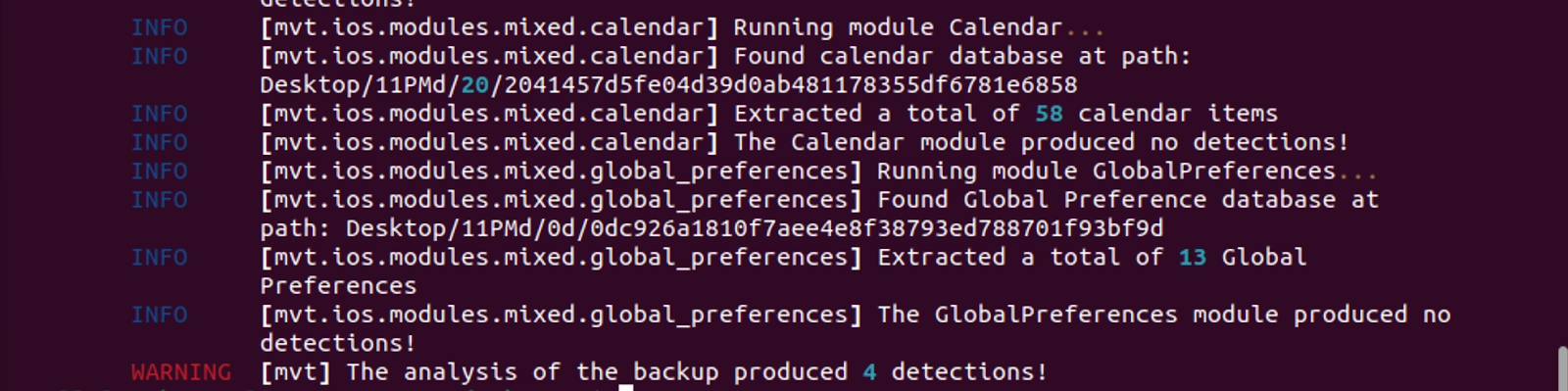
Image 1: Result of MVT IOCs scan with four detections
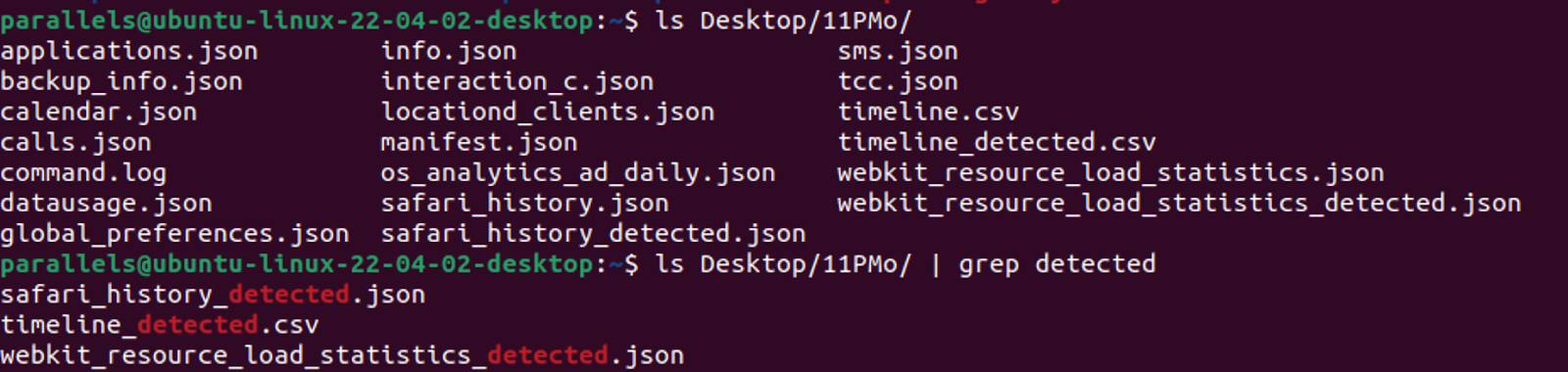
Image 2: The detected results are saved in separate files with “_detected” ending
6. If there are suspicions of spyware or malware without IOCs, but there are no detections, and a full file system dump isn’t feasible, users will need to work with the resources at hand. The most valuable files in the backup include:
Safari_history.json – check for any suspicious redirects and websites.
"id": 5,
"url": "http://yahoo.fr/",
"visit_id": 7,
"timestamp": 726652004.790012,
"isodate": "2024-01-11 07:46:44.790012",
"redirect_source": null,
"redirect_destination": 8,
"safari_history_db": "1a/1a0e7afc19d307da602ccdcece51af33afe92c53"
Datausage.json – check for suspicious processes.
"first_isodate": "2023-11-21 15:39:34.001225",
"isodate": "2023-12-14 03:05:02.321592",
"proc_name": "mDNSResponder/com.apple.datausage.maps",
"bundle_id": "com.apple.datausage.maps",
"proc_id": 69,
"wifi_in": 0.0,
"wifi_out": 0.0,
"wwan_in": 3381.0,
"wwan_out": 8224.0,
"live_id": 130,
"live_proc_id": 69,
"live_isodate": "2023-12-14 02:45:10.343919"
Os_analytics_ad_daily.json – check for suspicious processes.
"package": "storekitd",
"ts": "2023-07-11 05:24:31.981691",
"wifi_in": 400771.0,
"wifi_out": 52607.0,
"wwan_in": 0.0,
"wwan_out": 0.0
Keeping a backup copy of a control device is required to maintain a record of the current names of legitimate processes within a specific iOS version. This control device can be completely reset and reconfigured with the same iOS version. Although annual releases often introduce significant changes, new legitimate processes may still be added, even within a year, through major system updates.
Sms.json – check for links, the content of these links, and domain information.
        "ROWID": 97,
        "guid": "9CCE3479-D446-65BF-6D00-00FC30F105F1",
        "text": "",
        "replace": 0,
        "service_center": null,
        "handle_id": 1,
        "subject": null,
        "country": null,
        "attributedBody": "",
        "version": 10,
        "type": 0,
        "service": "SMS",
        "account": "P:+66********",
        "account_guid": "54EB51F8-A905-42D5-832E-D98E86E4F919",
        "error": 0,
        "date": 718245997147878016,
        "date_read": 720004865472528896,
        "date_delivered": 0,
        "is_delivered": 1,
        "is_finished": 1,
        "is_emote": 0,
        "is_from_me": 0,
        "is_empty": 0,
        "is_delayed": 0,
        "is_auto_reply": 0,
        "is_prepared": 0,
        "is_read": 1,
        "is_system_message": 0,
        "is_sent": 0,
        "has_dd_results": 1,
        "is_service_message": 0,
        "is_forward": 0,
        "was_downgraded": 0,
        "is_archive": 0,
        "cache_has_attachments": 0,
        "cache_roomnames": null,
        "was_data_detected": 1,
        "was_deduplicated": 0,
        "is_audio_message": 0,
        "is_played": 0,
        "date_played": 0,
        "item_type": 0,
        "other_handle": 0,
        "group_title": null,
        "group_action_type": 0,
        "share_status": 0,
        "share_direction": 0,
        "is_expirable": 0,
        "expire_state": 0,
        "message_action_type": 0,
        "message_source": 0,
        "associated_message_guid": null,
        "associated_message_type": 0,
        "balloon_bundle_id": null,
        "payload_data": null,
        "expressive_send_style_id": null,
        "associated_message_range_location": 0,
        "associated_message_range_length": 0,
        "time_expressive_send_played": 0,
        "message_summary_info": null,
        "ck_sync_state": 0,
        "ck_record_id": null,
        "ck_record_change_tag": null,
        "destination_caller_id": "+66926477437",
        "is_corrupt": 0,
        "reply_to_guid": "814A603F-4FEC-7442-0CBF-970C14217E1B",
        "sort_id": 0,
        "is_spam": 0,
        "has_unseen_mention": 0,
        "thread_originator_guid": null,
        "thread_originator_part": null,
        "syndication_ranges": null,
        "synced_syndication_ranges": null,
        "was_delivered_quietly": 0,
        "did_notify_recipient": 0,
        "date_retracted": 0,
        "date_edited": 0,
        "was_detonated": 0,
        "part_count": 1,
        "is_stewie": 0,
        "is_kt_verified": 0,
        "is_sos": 0,
        "is_critical": 0,
        "bia_reference_id": null,
        "fallback_hash": "s:mailto:ais|(null)(4)<7AD4E8732BAF100ABBAF4FAE21CBC3AE05487253AC4F373B7D1470FDED6CFE91>",
        "phone_number": "AIS",
        "isodate": "2023-10-06 00:46:37.000000",
        "isodate_read": "2023-10-26 09:21:05.000000",
        "direction": "received",
        "links": [
            "https://m.ais.co.th/J1Hpm91ix"
        ]
    },
Sms_attachments.json – check for suspicious attachments.
        "attachment_id": 4,
        "ROWID": 4,
        "guid": "97883E8C-99FA-40ED-8E78-36DAC89B2939",
        "created_date": 726724286,
        "start_date": "",
        "filename": "~/Library/SMS/Attachments/b8/08/97883E8C-99FA-40ED-8E78-36DAC89B2939/IMG_0005.HEIC",
        "uti": "public.heic",
        "mime_type": "image/heic",
        "transfer_state": 5,
        "is_outgoing": 1,
        "user_info": ",
        "transfer_name": "IMG_0005.HEIC",
        "total_bytes": 1614577,
        "is_sticker": 0,
        "sticker_user_info": null,
        "attribution_info": null,
        "hide_attachment": 0,
        "ck_sync_state": 0,
        "ck_server_change_token_blob": null,
        "ck_record_id": null,
        "original_guid": "97883E8C-99FA-40ED-8E78-36DAC89B2939",
        "is_commsafety_sensitive": 0,
        "service": "iMessage",
        "phone_number": "*",
        "isodate": "2024-01-12 03:51:26.000000",
        "direction": "sent",
        "has_user_info": true
    }
Webkit_session_resource_log.json and webkit_resource_load_statistics.json – check for suspicious domains.
{
        "domain_id": 22,
        "registrable_domain": "sitecdn.com",
        "last_seen": 1704959295.0,
        "had_user_interaction": false,
        "last_seen_isodate": "2024-01-11 07:48:15.000000",
        "domain": "AppDomain-com.apple.mobilesafari",
        "path": "Library/WebKit/WebsiteData/ResourceLoadStatistics/observations.db"
    }
Tcc.json – check which applications have been granted which permissions.
        "service": "kTCCServiceMotion",
        "client": "com.apple.Health",
        "client_type": "bundle_id",
        "auth_value": "allowed",
        "auth_reason_desc": "system_set",
        "last_modified": "2023-07-11 06:25:15.000000"
To collect data about processes, users can use XCode Instruments.
Note: Developer mode must be enabled on the iOS device.

Image 3: Showcasing XCode instruments profile selection
Process data collection:
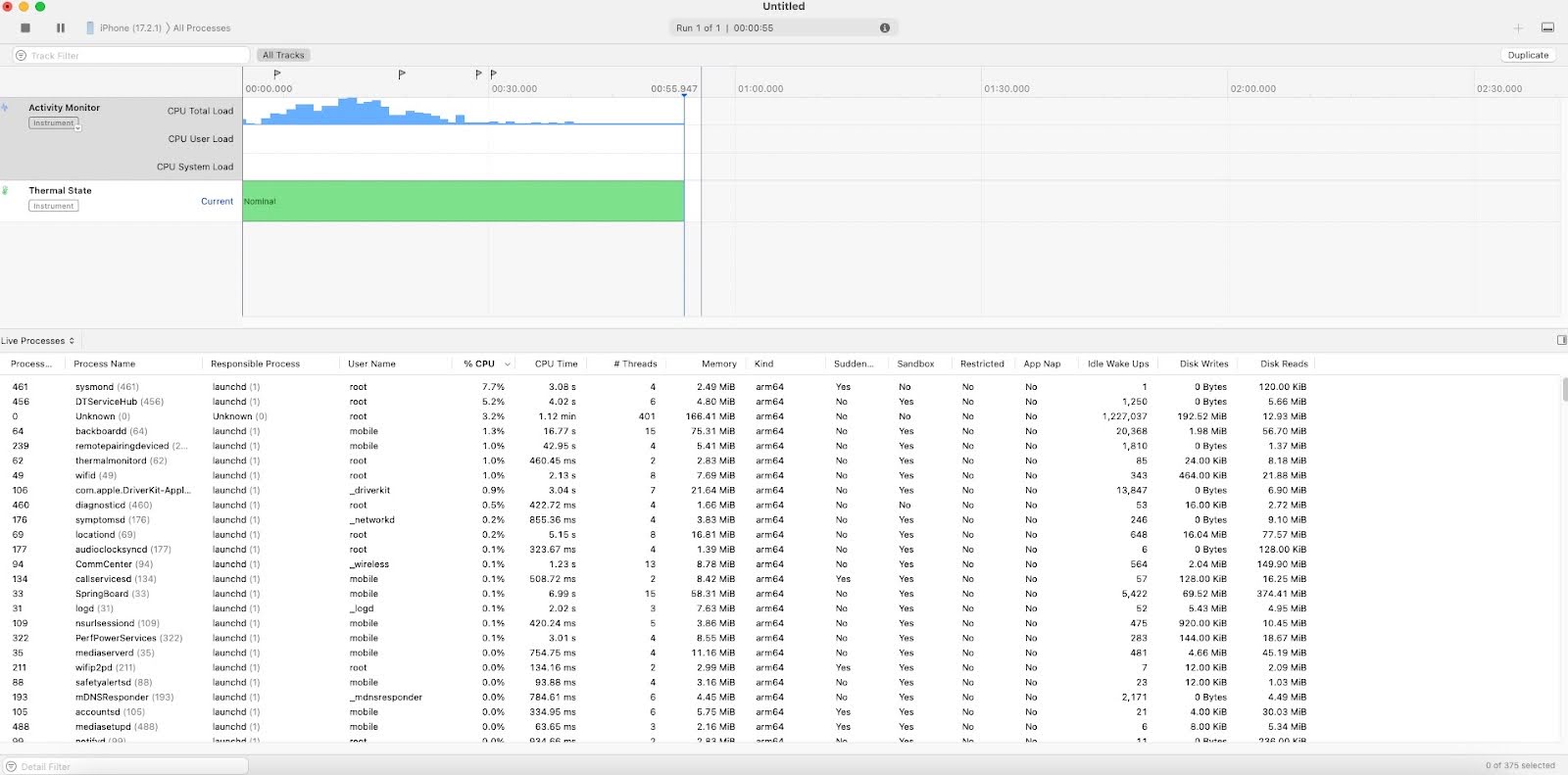
Image 4: Process list from iPhone
Recognizing and preventing Pegasus Spyware infections on iOS
While Pegasus tries to remain invisible, its intensive surveillance can sometimes produce noticeable side effects in your device’s behavior.
Keep in mind these signs aren’t exclusive to Pegasus (other issues or less advanced malware can cause them too), but a combination of these red flags should raise suspicion:
- Unusual battery drain or overheating
- Sluggish device performance and crashes
- Spontaneous reboots or shutdowns
- Increased data usage
- Appearance of unfamiliar or previously uninstalled apps
- Unexpected redirects to unfamiliar websites
Here are some essential recommendations to keep your devices up-to-date and prioritize mobile security to help prevent Pegasus spyware infection :
- Avoid clicking on suspicious links
- Review app permissions regularly
- Enable Lockdown mode for protection against spyware attacks
- Consider disabling iMessage and FaceTime for added security
- Always install the updated version of iOS
- Enable two-factor authentication (2FA) for Apple ID
- Limit third-party app permissions and revoke any permissions that seem excessive
- Monitor battery usage to identify unusual background activity
Steps to remove Pegasus Spyware from your smartphone
Removing Pegasus is not as simple as deleting an app, unfortunately, because of how deeply it embeds itself. However, there are steps you can take to try to remove Pegasus spyware from your iPhone or Android device. Keep in mind that these actions may not guarantee 100% removal in every case, but they are the recommended course of action for the average user.
The moment you suspect Pegasus, consider taking your device offline (by enabling Airplane Mode or removing the SIM card). This can temporarily halt any active data exfiltration and pause the spyware’s communication before you need to go back online for the removal steps below:
- Restore iPhone using the Device Firmware Update (DFU) mode.
Note: A factory reset does not help because it deletes only user data, not system data. If you can’t restore, you can put your iOS device in recovery mode and then restore it using a computer.
- Update your device’s OS and apps to current versions.
- Remove any unknown device connections to social media platforms.
When removing Pegasus spyware from your iPhone, it is best to work with the MVT resource provided by Amnesty International. As we’ve outlined in the previous section, do an iTunes/Finder encrypted backup of your iPhone, or use Android’s backup tools to back up just your personal data (exclude apps).
It’s also worth noting that Pegasus spyware removal isn’t a one-size-fits-all process; the exact method can vary depending on the device, the type of infection, and the spyware’s persistence mechanisms. For highly technical infections, users can work with an Incident Response team. Their expertise can help restore your device’s integrity and extract any necessary digital evidence.
Group-IB’s certified Digital Forensics and Incident Response laboratory helps companies restore the attack timeline and extract digital evidence. Our experts can reconstruct the timeline of an attack, pinpoint how the breach occurred, what data may have been accessed, and how the spyware maneuvered through the system. They can also extract digital evidence that can be critical for remediation efforts and, if necessary, legal proceedings, providing a clear picture of the incident to help prevent future attacks.
How to Prevent Future Pegasus Attacks
You prevent future Pegasus spyware attacks by planning for the attacker to come back, not just by cleaning the current infection. A motivated threat actor who reached you once will usually try again, so the work is to shrink what they can reach next time and to watch the device closely enough to catch a second attempt. The steps below assume you are a likely target rather than a casual one.
Treat a cleaned device as a fresh target
Removing Pegasus does not remove the reason you were chosen, so assume the same attacker will return. Move your accounts and sensitive conversations to a new device rather than trusting one that was already compromised. Set it up from scratch instead of restoring an old backup, which can carry a malicious payload straight back onto the clean phone.
Shrink what an attacker can reach next time
Every app and open network is another way in, so cut the ones you do not need. Delete apps you rarely open, and handle sensitive work only on trusted networks, since network injection attacks rely on an attacker sitting between you and the sites you load. Stop using any phone that the manufacturer no longer patches, because known vulnerabilities stay open forever.
Watch the devices most worth attacking
If your work would interest a government, treat your phones as monitored assets instead of personal gadgets. Give high-risk staff a separate, stripped-down device for sensitive conversations only, and keep it off their everyday accounts.
Enroll those devices in mobile threat monitoring and run periodic forensic checks, because Pegasus spyware is designed to remain silent and typically surfaces only when teams are already looking for it.
Best Practices for Mobile Device Security Against Spyware
Good mobile security against spyware is mostly about denying it an easy way in. It needs to be installed, require physical access to your phone, or access the accounts your phone syncs with, and you can make each of those harder.
The same habits that frustrate stalkerware also raise the cost of Pegasus spyware, so they are worth keeping even if you don’t think someone is after you.
Install software only from sources you can trust
Most spyware that is not a zero-click attack still has to be installed, so the simplest defense is to never give it that chance. Stick to the official App Store or Google Play, and avoid sideloaded apps, third-party stores, and anything you are pushed to install from outside them.
Refuse any configuration profile or device-management prompt you did not set up yourself, because on iOS these can hand an outsider deep control of the phone.
Lock down physical access to the device
Spyware can also arrive through a few minutes of hands-on access, so treat the phone like a key to everything on it. Use a long passcode instead of a short PIN, and pair it with biometric unlock and a short auto-lock so a borrowed phone secures itself fast. Do not tap “trust” when you plug into an unfamiliar computer or public charger, since that prompt can open the door to data theft or quiet installation.
Protect the accounts your phone syncs with
Your iCloud or Google account is a second copy of your phone, so an attacker who gains access to it can read your data without ever touching the device.
Give that account a long, unique password or a passkey, and keep your backups encrypted so a stolen copy stays unreadable. Watch for password reset prompts or login alerts you did not initiate, because those often appear before someone tries to pull your data from the cloud.
Pegasus Spyware Controversies
Pegasus spyware is controversial because governments have repeatedly turned it against people it was never meant to reach, including journalists, activists, lawyers, and opposition politicians. Investigations and court cases have linked NSO Group’s tool to surveillance abuses in dozens of countries, leading to US sanctions and a series of lawsuits. The story is still moving, including a recent change in who controls the company.
How the Pegasus Project exposed widespread abuse
In 2021, a group of 17 news organizations, working with Amnesty International and the nonprofit Forbidden Stories, published the Pegasus Project, based on a leaked list of more than 50,000 phone numbers flagged as potential targets. Their analysis found traces of the spyware on phones belonging to reporters, human rights workers, and political figures, and connected it to people close to murdered Saudi journalist Jamal Khashoggi.
The reporting turned Pegasus from a niche security story into a global scandal and prompted official investigations, including a dedicated inquiry by the European Parliament.
Sanctions and government restrictions
In November 2021, the US Commerce Department added NSO Group to its Entity List, which bars American companies from selling technology to it. The department acted after concluding that foreign governments had used the spyware to target officials, journalists, and activists, including around a dozen US government employees abroad.
In 2023, a White House executive order went further and barred most US federal agencies from using commercial spyware that threatens national security or human rights.
The lawsuits against NSO Group
WhatsApp sued NSO in 2019 after a zero-click attack affected about 1,400 of its users, including journalists, lawyers, and government officials. A federal judge found NSO liable in December 2024, and in May 2025, a jury ordered it to pay roughly $167 million in punitive damages plus about $445,000 in compensatory damages. The judge later cut the punitive amount to $4 million and issued a permanent order barring NSO from targeting WhatsApp, while NSO continues to appeal.
Apple filed its own lawsuit in 2021 over the FORCEDENTRY exploit and sought a court order banning NSO from using Apple products. In 2024, Apple voluntarily withdrew the case, saying that pressing on risked exposing the threat-intelligence methods it relies on to defend against spyware and that the wider spyware market had grown beyond NSO alone. NSO agreed the case should be dropped.
How Group-IB protects businesses against Pegasus Spyware
Securing mobile devices, applications, and APIs is crucial, particularly when they handle financial transactions and store sensitive data. Organizations operating in critical sectors, government, and other industries are prime targets for cyberattacks, including espionage, especially high-level employees.
Researching iOS devices presents challenges due to the system’s closed nature. Group-IB Threat Intelligence, however, helps organizations worldwide identify cyber threats across different environments, including iOS, with our recent discovery being GoldPickaxe.iOS – the first iOS Trojan to harvest facial scans and use them to potentially gain unauthorized access to bank accounts.
Group-IB Threat Intelligence provides a constant feed on new and previously conducted cyber attacks, the tactics, techniques, and behaviors of threat actors, and susceptibility of attacks based on your organization’s risk profile— giving a clear picture of how your devices can be exploited by vectors, to initiate timely and effective defense mechanisms.
If you suspect your iOS or Android device has been compromised by Pegasus spyware or other APT mobile malware, contact our experts for immediate support. To perform device analysis or set up additional security measures, organizations can also contact Group-IB’s Digital Forensics team for assistance.
FAQ
How does Pegasus spyware infect devices?
Pegasus spyware infects devices by exploiting security vulnerabilities in smartphone software, often delivered via malicious links, messages, or app exploits. The spyware also frequently uses zero-click attacks that require no user interaction to covertly install itself and gain control of the device without your knowledge.
Which organizations or individuals are most at risk from Pegasus spyware?
Pegasus spyware is generally used against high-profile targets rather than ordinary users. Journalists, human rights activists, political dissidents, opposition politicians, lawyers, and government officials are among those most likely to be targeted. High-level executives and organizations handling sensitive data (such as media outlets, NGOs, or companies with valuable intellectual property) can also be at risk if they have information that attracts state-level spyware attacks.
Can Pegasus spyware be detected and removed from a device?
Pegasus can be difficult to detect and remove because it’s designed to be stealthy and leave virtually no traces. Standard antivirus software won’t catch it; only specialized digital forensics tools (like Amnesty International’s Mobile Verification Toolkit) have a chance at spotting Pegasus infections, and even then the spyware may attempt to self-destruct to cover its tracks. If Pegasus is found on a device, the only reliable way to eliminate it is to completely wipe or replace the device, since even a factory reset isn’t always guaranteed to remove the spyware.
What security measures help prevent Pegasus spyware infections?
To prevent Pegasus infections, keep your phone’s operating system and apps fully updated as the spyware often exploits unpatched software bugs. High-risk users should consider enabling Apple’s Lockdown Mode on iPhones, which blocks many exploit channels and is currently one of the best defenses against Pegasus spyware. Additionally, avoid clicking on suspicious links or attachments, limit unnecessary app permissions, and use reputable mobile security apps to add layers of protection.
Has Pegasus spyware faced legal action or bans?
Yes – Pegasus spyware and its creators (the NSO Group) have been subject to legal actions and bans due to its misuse. WhatsApp’s owner (Meta) sued NSO Group in 2019 for using Pegasus to hack about 1,400 WhatsApp users, and Apple filed a lawsuit in 2021 accusing NSO of targeting iPhone users with Pegasus. In late 2021, U.S. Department of Commerce blacklisted NSO Group by adding it to its Entity List, and a 2023 White House executive order banned most U.S. federal agencies from using Pegasus-like spyware.
What are zero-click attacks in Pegasus spyware?
A zero-click attack installs Pegasus without you doing anything, so there is no link to tap and no file to open. It works by exploiting a flaw in how an app handles incoming data, usually a message or a call the phone processes on its own. That silence is what makes these attacks so dangerous, because the spyware can land and start watching before you have any reason to suspect it.
Does factory resetting a phone remove Pegasus spyware?
A factory reset is not a reliable way to remove Pegasus, because it clears your personal data while leaving the system files where the spyware can hide untouched. A full firmware restore through recovery or DFU mode gives you a better chance, since it rewrites the operating system itself. For a high-value target, the safest move is to stop using the phone and switch to a new device, because no wipe is guaranteed against spyware this advanced.
How can I tell if my phone has Pegasus spyware?
You usually cannot tell from the phone alone, because Pegasus is built to run silently and clean up after itself. Warning signs like fast battery drain, overheating, unexpected restarts, or higher data usage can hint at a problem, but they can also point to many ordinary faults. The only dependable way to confirm an infection is a forensic check of a device backup with a tool such as the Mobile Verification Toolkit, ideally run by someone who does this work.
How do cybersecurity companies detect Pegasus infections?
Cybersecurity and forensic teams detect Pegasus by examining a device’s data rather than trusting the phone’s own view of itself. They take an encrypted backup, then scan it for known indicators of compromise, suspicious processes, odd network connections, and traces left in system logs. They also draw on threat intelligence about NSO’s infrastructure and methods, which helps them spot new variants that a simple indicator list would miss.
References
[1] Amnesty.org – Forensic Methodology Report: How to catch NSO Group’s Pegasus
[2] Citizenlab.ca – Independent Peer Review of Amnesty International’s Forensic Methods for Identifying Pegasus Spyware
Learn more about Group-IB Digital Forensics
Employ services of a certified Digital Forensics and Incident Response laboratory to restore the attack timeline and extract digital evidence


